
Quickstart
Spin up your first isolated agent box and launch Claude Code inside it — from a single terminal command. This guide takes about three minutes end to end.
Before you begin
AgentBox runs your agents inside dedicated, isolated VMs — local or in the cloud. Before the quickstart, make sure you have the runtime in place. Everything here uses the local Docker provider, which needs no account.
- Docker — Desktop or OrbStack, running.
- Node
>=20.10on yourPATH. - MacOS or Linux
- An agent CLI — e.g.
claude,codex,opencodeorpi. - (Optional) an account for Vercel, Hetzner, DigitalOcean or Daytona.
NB: Agentbox will open a link for OAuth and acquire the tokens for your AI subscription and for cloud providers API keys.
NOTE
The first run builds the agentbox/box:dev image (~1 GB). It's a one-time download. On cloud
boxes it will create a base snapshot directly online.
Install the CLI
Install AgentBox globally and run the one-time setup. The setup step wires up
portless so box web apps share the same URL inside the box and on your host.
# install globally, then run one-time setup
npm -g i @madarco/agentbox && agentbox install
On a Mac you can also start from the menu-bar app: its setup wizard installs the CLI for you. You only need Node.js.
During agentbox install you'll be prompted to log in to any cloud providers you
want to use (Vercel, Hetzner, DigitalOcean, Daytona, E2B) — this is not needed for the
default local Docker provider. You'll then be asked to build the base image for
each selected provider (e.g. the local Ubuntu Docker image, the Vercel base
sandbox, the E2B template, etc.) so the first box starts fast, and finally whether
to make that provider the default for new boxes — say yes and a plain
agentbox claude goes there, with no --provider flag or provider prefix.
NOTE
You can run agentbox install again at any time to add more providers — each run only logs in and
builds the base image for the providers you pick.
Launch your first box
One command teleports your current project into a fresh box and attaches an agent session. Run it from inside your project directory:
$ agentbox claude
⬡ building agentbox/box:dev … cached
↳ teleporting ./my-app → /workspace
↳ injecting ~/.claude credentials & sessions
✓ box 1 ready in 0.8s · claude code attached

╭─ Claude Code v2.1.161 ───────────────────────────────────╮
│                                                          │
│                   Welcome back, User!                    │
│                                                          │
│                        ▐▛███▜▌                           │
│                       ▝▜█████▛▘                          │
│                         ▘▘ ▝▝                            │
│                                                          │
│        Opus 4.8 (1M context) · Claude Max ·              │
│        user@example.com's Organization                   │
│        ~/workspace                                       │
│                                                          │
╰──────────────────────────────────────────────────────────╯
The first time you launch a box in a project, you'll be asked to complete the
setup wizard. It creates an agentbox.yaml file describing how to install and run
your project, and captures a snapshot of the box with all your project's
dependencies already installed — so the next box boots fast. You can optionally
commit agentbox.yaml to your repo to share it with your team, or simply ask the
agent to download it into your local machine.
That's it — you're now inside an isolated box with your files mounted two-way at
/workspace and Claude Code running in a detachable tmux session. Detach any time
with Ctrl+b d; the agent keeps working.
On Cloud boxes, the workspace is synced with the box but the git credentials are kept on your computer, and each write operation needs to be authorized from the footer.
To use a cloud provider, run agentbox install and select the desired provider, then
prefix the command with the provider name — for example:
agentbox hetzner claude
agentbox vercel codex
The prefix is only needed when the provider isn't your default. If you said yes to
"make it the default for new boxes" during agentbox install, plain agentbox claude
already goes there — see box.provider.
Watch it work
Detach with Ctrl+b followed by d in rapid succession. Then you can reattach
with agentbox attach 1, where 1 is the number assigned in sequence to
every box in the same project.
You can attach to any running Claude / Codex / OpenCode session, and also open the box's live screen to follow the agent's browser and IDE in real time.
The viewer streams the box's full desktop over noVNC.
Useful commands
A handful of commands cover most day-to-day work. Run agentbox --help for the full
list.
| Keys | What it does |
|---|---|
Ctrl+a d | Detach from the box |
Ctrl+v | Paste an image or screenshot, even on cloud boxes |
Ctrl+a u | Open the web preview in your computer browser with a transparent proxy |
Ctrl+a s | Open a screen sharing of the box browser shared with your agent |
Ctrl+a c | Attach to the VSCode server running inside the box |
Ctrl+a t | Open a fresh shell in the same box, in a new tab |
Ctrl+a k | Destroy the box (asks to confirm) |
| Command | What it does |
|---|---|
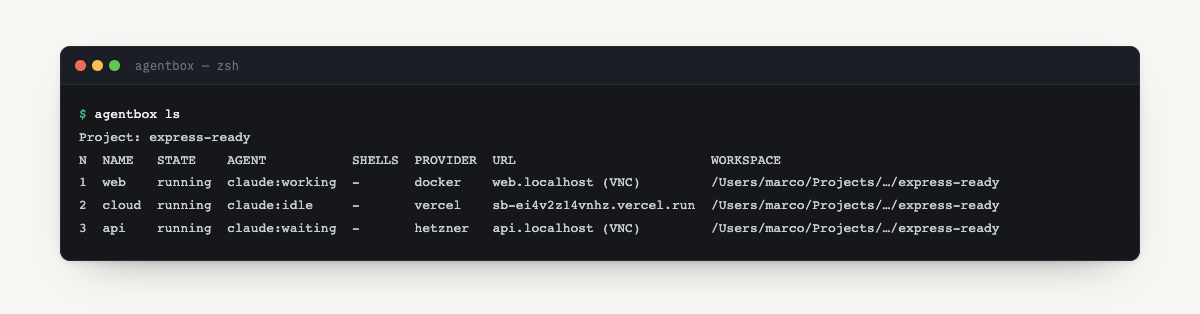
agentbox list | List every box in the current project with its agent's live state. |
agentbox attach 1 | Reattach to the running agent session on box 1 (claude / codex / opencode / pi). |
agentbox shell 1 | Open an interactive bash shell inside the box. |
agentbox url | Open the box's web app URL in your browser. |
agentbox pause 1 | Freeze the box to save resources — resumes sub-second. |
agentbox destroy <N or box name> | Tear down the box and discard its upper volume. |
Want to run the same agent on a cloud provider instead? Prefix the command with the
provider name — for example agentbox hetzner claude. See Hetzner
to get set up.
HEADS UP
Git credentials never leave the host. When the agent pushes to a remote, AgentBox forwards an explicit permission request back to your machine before anything goes out.