
Hetzner
Run your agents on a real, inexpensive Hetzner VPS with full root and Docker-in-Docker
Run your agents on a real, inexpensive cloud VM you fully control — no local Docker needed. Each box is its own Hetzner Cloud VPS (1:1) you drive with the same agentbox commands as a local box, reached over pure OpenSSH (no third-party agent in the box — you own root). Heads up: a Hetzner box is a real VPS that bills ~€4/mo even when stopped — pause is poweroff/poweron, not free — and its firewall locks to your current egress IP.
Switch per box with --provider hetzner, or pin it project-wide with box.provider: hetzner in agentbox.yaml. Pick Hetzner for bare-VPS control (full kernel, your own region), a Cloud Firewall locked to your egress IP, and full Docker-in-Docker. Cost is roughly €4/mo per running box. Comparing options? See local-docker, daytona, vercel, and e2b.
Set up
The easiest path is the interactive wizard — it signs you in and bakes the base snapshot in one flow:
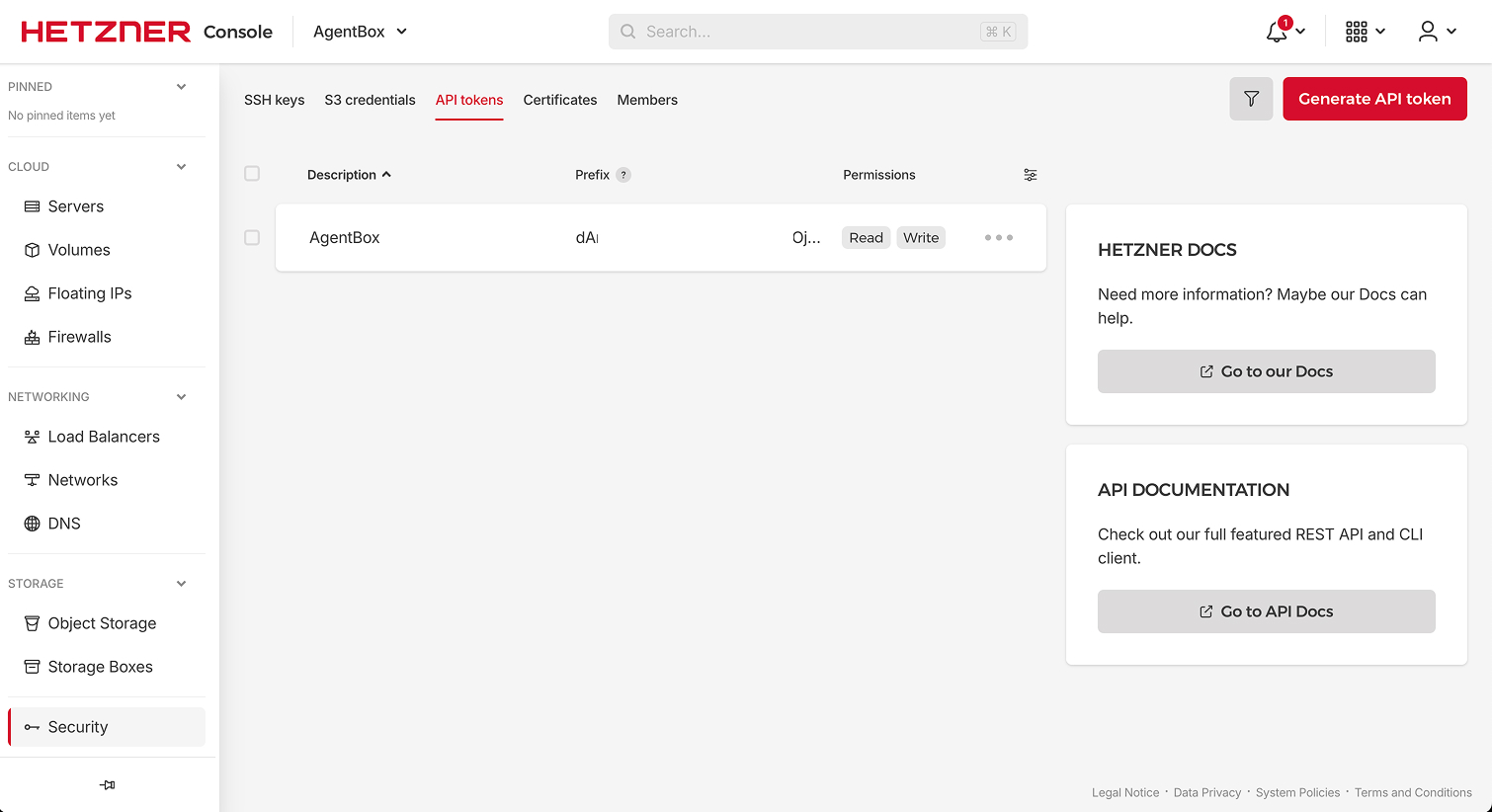
agentbox install # then select hetznerPaste a Hetzner Cloud API token when prompted — a Read & Write token from the target project's Security → API Tokens page (boxes will be created in whichever project minted it). Credentials persist to ~/.agentbox/secrets.env; project .env files are never harvested. install also bakes the base snapshot (a one-time agentbox prepare --provider hetzner under the hood) with the AgentBox runtime — agentbox-ctl, tmux, the browser stack — so every new box boots ready in ~15-20s. Agents are a separate, optional tier on top (see below).
For CI or scripted setup, run the explicit equivalents:
agentbox hetzner login                 # credentials only
agentbox prepare --provider hetzner    # bake the base snapshot
NOTE
Mint the token under the specific Hetzner project you want boxes to live in, and make it Read & Write. Read-only tokens can't create servers.
Use it
agentbox hetzner claudeagentbox hetzner create|claude|codex|opencode|pi is sugar for the same command with --provider hetzner.
Prepare snapshot
Hetzner can't build an image from a Dockerfile, so a one-time base snapshot must be baked before the first create. agentbox prepare --provider hetzner boots a throwaway VPS, runs the install script, snapshots the result, then cleans up.
agentbox prepare --provider hetznerThe snapshot is a shell mirror of the Docker box image (Node, Python, Docker, the VNC stack, Google Chrome, and the agentbox-ctl supervisor). First run takes ~6 minutes; after that, every create --provider hetzner boots from it in ~15–20s. Re-running is idempotent — pass --force to rebake.
The base carries no agent. Add one as its own snapshot, on top of the base:
agentbox prepare --provider hetzner --agents claudeThat boots the base, runs just Claude Code's install recipe and re-snapshots (~3–4 min). agentbox claude --provider hetzner then boots that snapshot with the agent already in place. Each agent set gets its own record, so baking --agents codex later does not invalidate the claude one, and each rebake deletes only the snapshot it replaces.
Skipping this is fine: a box whose agent isn't baked installs it on first use (~30–60s), and the result is identical — the bake and the on-demand install run the same recipe. It just moves that minute from bake time to every box's create.
When you upgrade AgentBox, create --provider hetzner notices if the new install would bake a different snapshot (the comparison is checksum-based on the baked files — CLI version strings on their own don't count) and offers to rebake inline; with -y or non-TTY it instead warns loudly and boots on the existing snapshot. agentbox hetzner login also nudges you toward agentbox prepare --provider hetzner on the first successful login.
If the bake fails installing Claude Code
The bake installs Claude Code with Anthropic's native installer, whose CDN occasionally returns a Cloudflare 403 to cloud-datacenter egress IPs (Hetzner among them). The bake retries three times and then aborts rather than shipping a Claude-less snapshot. If it keeps failing, switch to the npm installer:
agentbox prepare --provider hetzner --agent-setting claude.install=npm
# or persist it: agentbox config set claude.install npm
npm installs @anthropic-ai/claude-code and symlinks it into the same
~/.local/bin/claude path the native installer uses, so the box behaves
identically. Bake-time only — changing it re-bakes the snapshot.
HEADS UP
The bake costs a few minutes and a couple euro-cents, but you only do it once per account.
Create a box and run an agent
Once login and prepare are done, create/claude/codex/opencode/pi/shell behave exactly like local Docker — only --provider hetzner (or the pinned config) differs. The workspace is seeded from a host git bundle plus your uncommitted and untracked changes, the same as the other clouds (see teleport a project and sync & git).
$ agentbox create -y --provider hetzner
# VPS provisioned + firewall locked + SSH up (~90s cold, ~15-20s from snapshot)

$ agentbox shell 1 --no-tmux -- uname -a
Linux agentbox-7f3a ... x86_64 GNU/Linux
Or jump straight into an agent, which auto-creates the box:
agentbox claude --provider hetznerSee run an agent, access your box, and background & parallel.
Sizes and regions
The default VM is cx23 (2 vCPU / 4 GB / 40 GB, ~€4/mo while running) in location nbg1 (Nuremberg). On Hetzner, --size is the server type and --location is the datacenter. Change them per box, or pin them with box.sizeHetzner and box.hetznerLocation (precedence: flag > box.size<Provider> > box.size / box.hetznerLocation) — see configuration.
agentbox create -y --provider hetzner --size cx33 --location fsn1Locations are nbg1 (Nuremberg), fsn1 (Falkenstein), hel1 (Helsinki), and ash (Ashburn, US). --location on a non-hetzner provider is ignored with a warning. The bake VPS location can be set the same way: agentbox prepare --provider hetzner --location fsn1 (or pin box.hetznerLocation).
After the box comes up, AgentBox reports the real provisioned resources read back from Hetzner — e.g. provisioned 4 vCPU / 16 GB RAM / 160 GB disk — rather than a static guess, and stores them on the box record.
Preflight validation
Before AgentBox creates any billable resource (firewall, SSH key, server), it validates your server-type + location choice against Hetzner's live /server_types catalog and fails fast with an actionable message — so a typo never bills you for a half-created box:
- Unknown type (
--size cx99) → lists valid non-deprecated x86 types. - ARM type (
--size cax31) → rejected; AgentBox base snapshots are x86-only, socax*types aren't supported. - Deprecated type (e.g. the old
cx22) → rejected, with current alternatives. - Type not offered in the location (
--size ccx23 --location nbg1) → lists where it is offered and reminds you of--location. - Disk too small for the base snapshot → asks for a larger type.
Dedicated (ccx) types and account limits
New Hetzner accounts start with a low server limit, and the dedicated-vCPU ccx* types count
against it quickly. If Hetzner refuses the create with resource_limit_exceeded, AgentBox
surfaces the account-limits explanation and points you at the Hetzner
Console → your project → Limits to request an increase. An
out-of-capacity error (resource_unavailable) suggests trying another --location.
Firewall
Each box gets its own Hetzner Cloud Firewall with a single rule: inbound TCP port 22 from your host's egress IP only. All box traffic flows over SSH, so port 22 from your IP is genuinely all that's exposed.
If you change networks (new Wi-Fi, VPN toggle), your egress IP changes and SSH times out. agentbox hetzner firewall sync <box> re-detects your IP and updates that box's rule with no reboot:
agentbox hetzner firewall sync smokeTIP
Moved networks and agentbox shell suddenly times out? Run agentbox hetzner firewall sync <box> — that's almost always it.
To reach a box from another device (a phone over Terminus/Blink, with your laptop off), open the firewall and hand the device a key: agentbox inbound <box> open then agentbox connect <box> --add-key <device.pub>. The baked sshd is key-only (vscode-only, no passwords), so open exposes port 22 to the internet but only your keys get in. See remote access.
Web apps, checkpoints, and Docker
The box's standard capabilities work as on any provider, with a few Hetzner specifics:
- Web apps / preview URLs.
agentbox url <box>returns a URL, and the in-box portless proxy mirrors it sohttps://<box-name>.localhostresolves the same content from your host browser and from inside the box.agentbox screenworks too. See web apps & tunnels and browser & screen. - Checkpoints map to Hetzner
create_imagesnapshots (no-pause by default, matchingdocker commit). Set a per-provider default withagentbox checkpoint set-default --provider hetzner <ref>. See checkpoints & pausing. - Docker-in-Docker works unmodified. See Docker-in-Docker.
- Services & tasks from
agentbox.yamlrun via the in-box supervisor. See services & tasks.
agentbox checkpoint create smoke setupTIP
Because Hetzner checkpoints are full-disk snapshots, capturing one after your project's setup lets later boxes boot ready-to-go and skip workspace seeding.
Specs
| Spec | |
|---|---|
| Base image | Ubuntu 24.04 snapshot |
| Build method | Baked snapshot — install script on a throwaway VPS then create_image (agentbox prepare --provider hetzner); no Dockerfile |
| Docker-in-Docker | Yes (full root, unmodified) |
| SSH | Yes — one persistent OpenSSH ControlMaster per box |
| Arch | x86_64 (amd64) |
| Live snapshots | create_image snapshots (no-pause default); pause = poweroff/poweron and a stopped VPS still bills ~€4/mo |
| Preview URL | SSH local port forward via ssh -O forward, mirrored to https://<box-name>.localhost (Portless) |
Caveats
- Pause still bills. Hetzner charges ~€4/mo even for a stopped VPS. Destroy the box (
agentbox destroy <box> -y) to stop billing entirely — it deletes the VPS, its firewall, and the per-box SSH key. - No live stats.
agentbox topanddashboardrender—for CPU/mem; the basic API doesn't expose per-server metrics. - No shared credential volume. Agent credentials are pushed to each box via scp at create time.
- IPv4 only. SSH targets the VPS's IPv4 address; IPv6-only host networks aren't exercised yet.
agentbox prune --provider hetznerisn't wired yet. Clean up orphans from the Hetzner dashboard or the REST API ($HCLOUD_TOKENlives in~/.agentbox/secrets.env).
HEADS UP
Destroying is the only way to stop billing. A stopped box keeps accruing the ~€4/mo charge.