
Core concepts
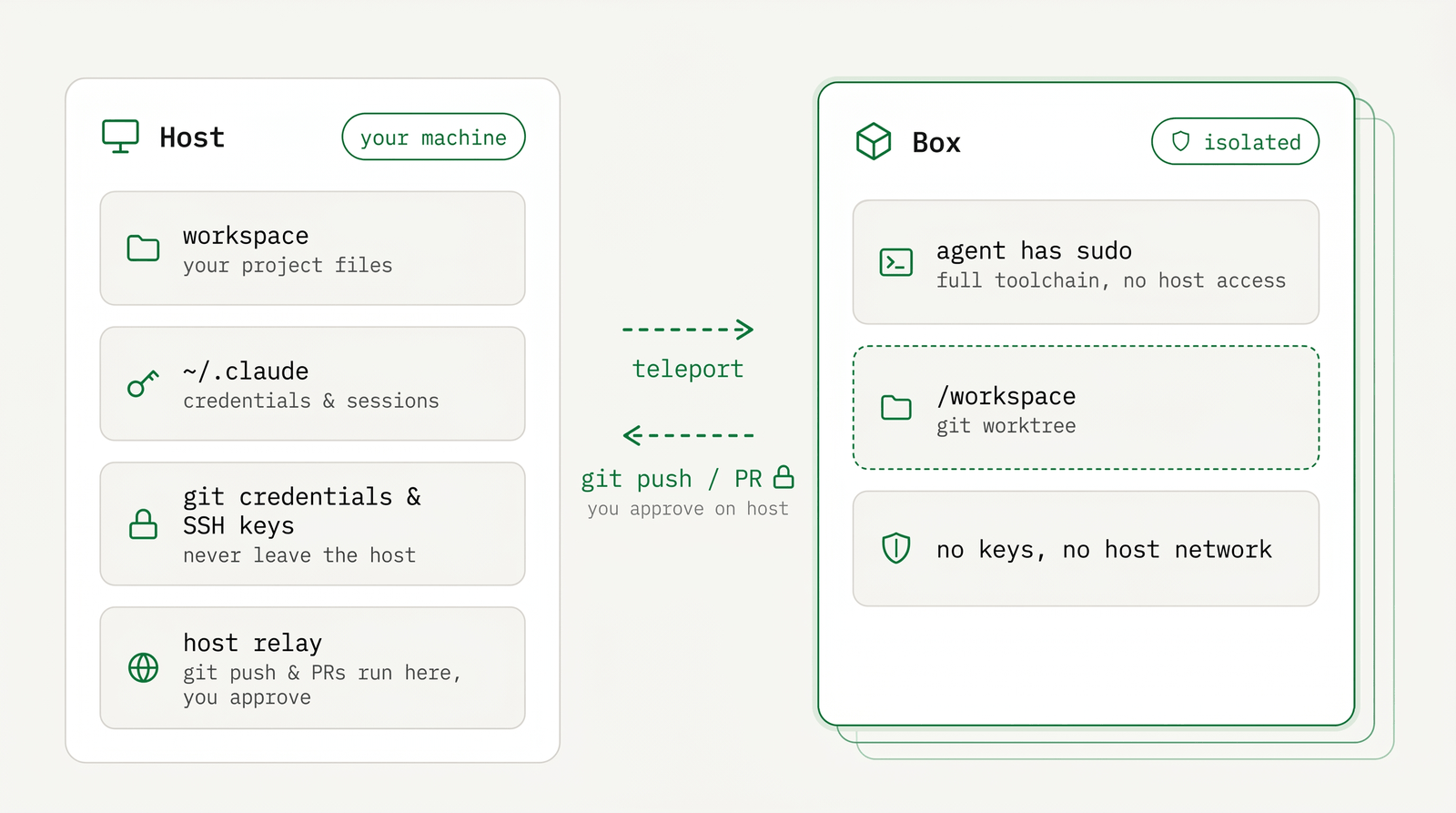
How AgentBox works. An isolated machine per agent run, parallel runs and fast switching, with credentials kept on your machine
When you launch an agent, AgentBox copies your project into an isolated Linux
machine called a box. The agent runs with passwordless sudo inside the
box, so it can install packages, run servers, run Docker, and commit. It has no
access to your laptop's files, keys, or network. You can run several boxes at
once, switch between them in under a second, and every git push or pull
request runs on your machine only after you explicitly approve it — the box
never touches your remotes on its own.
Six ideas cover how it works. Each section below explains one, with links to the details.
A full computer per agent — and it can't break your machine
A box is a Linux machine, one per agent run. The agent runs as a normal user
with passwordless sudo and a full toolchain, so it can apt install packages,
run a database, or run Docker inside the box. When you're done, run destroy and the box is gone. None of it touched
your host.
agentbox create     # spin up a fresh box
agentbox destroy 1  # throw it away
Because the box has no access to your host, you don't need to approve each command the agent runs. The worst an agent can do is break its own box, which you delete and recreate.
WHY
Auto-approve is safe here. The agent can't reach your files, keys, or network, so it runs without stopping to ask for permission.
The box keeps everything it built until you destroy it; stop and pause
preserve it. See Local Docker for the lifecycle and
Docker-in-Docker for running Docker inside a box.
Run agents in parallel, switch in under a second
One command creates a box, starts the agent, and attaches you to it. You can run Claude Code, Codex, and OpenCode at the same time, each in its own box.
agentbox claude              # Claude Code on one box
agentbox codex               # Codex on another, in parallel
agentbox attach 1            # jump back to the first
Each agent runs in a detachable tmux session. Press Ctrl+a d to detach and the
agent keeps running. Idle boxes are paused rather than stopped, so they use no
CPU while their memory stays in place. unpause resumes in under a second, and
editors and language servers continue where they left off.
TIP
Detach with Ctrl+a d and start more boxes. Reattach to any of them; switching pauses the box you
leave and resumes the one you open.
Per-agent detail and auth: Run an agent. Many boxes and queued background runs: Background & parallel.
Start warm with checkpoints
The first box in a project installs dependencies and builds its caches. A
checkpoint saves that state: a snapshot of /workspace including
node_modules, build caches, and in-box .env files. New boxes boot from the
checkpoint in about a second instead of installing from scratch.
agentbox checkpoint create 1 --set-default   # save the warm state as the project default
agentbox create                              # new box, already warmed up
A common pattern is to checkpoint after the setup wizard finishes or a PR merges, so later boxes start ready. Full mechanics: Checkpoints & pausing.
Local or in the cloud — same command
The default box is a local Docker container, which runs on your machine at no cost. To run elsewhere, add one flag and the same commands target a cloud provider. This helps when a build is too heavy for your laptop, a teammate needs to attach, or you want a URL you can share. The cloud providers give each box a public HTTPS URL for its dev server.
| Provider | Where the box lives | Reach for it when |
|---|---|---|
docker (default) | Local Docker container | Fast, free, and fully local. The best default. |
hetzner | A Hetzner VPS, one per box | You want a real VM you control: root, full kernel, your region. |
daytona | A managed Daytona sandbox | The work outgrows the laptop or a teammate needs to attach. |
vercel | A Firecracker microVM | Fast snapshots, public URLs, free pause/resume. No in-box Docker. |
agentbox claude --provider hetzner     # run this agent on a Hetzner VPS
agentbox config set box.provider daytona   # or pin a default for the project
NOTE
Each cloud needs a one-time agentbox prepare --provider <name> and a login
(agentbox hetzner login, etc.). Docker needs neither. One page each:
Local Docker, Hetzner,
Daytona, Vercel.
Your real project, isolated git
A box doesn't start from HEAD. It starts from your current working state:
AgentBox copies your uncommitted work (a git stash plus untracked files) into the
box, so the agent picks up where you left off.
Inside the box, /workspace is a git worktree on a per-box branch
agentbox/<box-name>, created against your real .git. The agent's commits land
in your repository right away, but only on that branch. Your checked-out branch
and working tree are never touched. Build artifacts like node_modules, .next,
and target stay in the box and are rebuilt inside Linux, so host binaries don't
mix in.
agentbox open mybox # pull /workspace to a host folder and open itHow projects get in: Teleport a project. Moving work back and pushing: Sync & git.
Credentials never leave your machine
Boxes hold no SSH keys and no git credentials. git push works through the
host relay, a small process that starts on your first run and is shared by
every box. The agent asks the host to push, open a pull request, or open a URL,
and the host runs it with your identity (SSH agent, ~/.gitconfig, gh auth)
and returns the output.
Everything written to your remotes is written by the host, as you — and only what is destructive or irreversible pauses for your explicit approval. Publishing commits is ordinary, revertable work and goes straight through; deleting a remote branch, force-pushing a branch the box did not create, or copying a file out of the project folder raises a prompt in your attached session that defaults to no.
$ git push   # the box's git shim routes this through the relay (or: agentbox-ctl git push)
# runs `git push` as you on the host — no credentials ever enter the box.
# A destructive push (a deletion, a force-push outside the box's own branch)
# pauses for your approval first.
WHY
The safety model: the agent runs unsupervised inside an isolated box, every push to a remote runs on your machine as you, and nothing you cannot undo happens without your yes. No secrets enter the box.
Push, pull, PRs, and approvals: Sync & git.
Next
- Get a project into a box: Teleport a project
- Run an agent: Run an agent
- Get inside a box: Access your box
- Reach its web app or screen: Web apps & tunnels, Browser & screen
- Full command list: the CLI reference