
Configuration keys
User config keys and how the layers resolve
AgentBox reads layered defaults at the start of every command. The same key shape lives in three files plus a runtime CLI-flag layer, so a preference can be a one-off flag, sticky for one project, or shared with your whole team.
You rarely need to touch config — every key has a built-in default and most surfaces also expose a one-off CLI flag. Config is for making a preference stick.
TIP
Don't memorize keys. agentbox config list prints every key with its current value and where it
came from, and agentbox config list --include-advanced adds the advanced ones.
Config layers
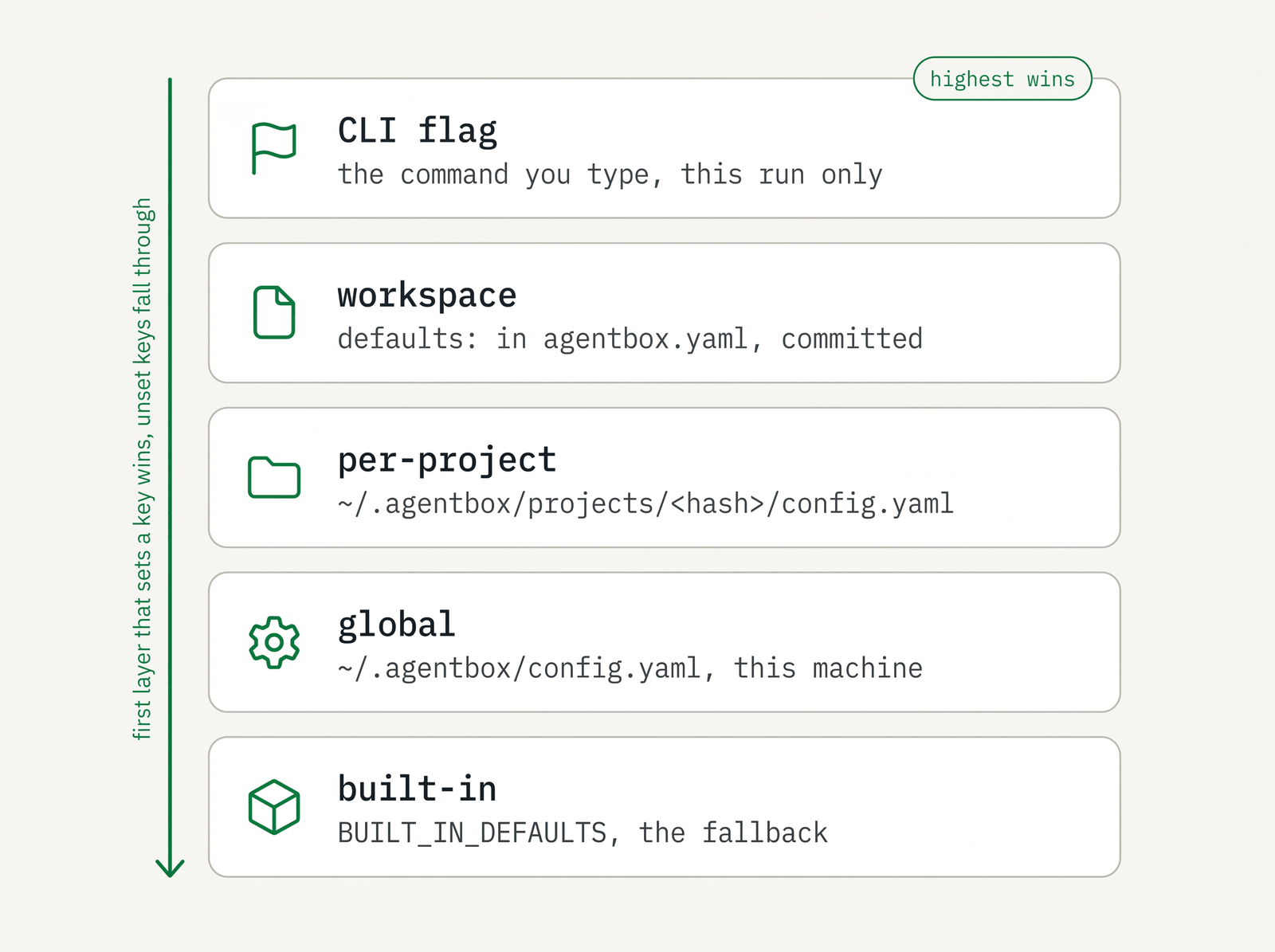
AgentBox merges four layers on top of the built-in defaults. Highest layer that sets a key wins:
CLI flag > workspace defaults: > per-project > global > built-in default| Layer | Where it lives | Scope |
|---|---|---|
| CLI flag | the command you type | this invocation only, never persists |
| workspace | the defaults: block in agentbox.yaml | committed, shared with the team |
| per-project | ~/.agentbox/projects/<hash>/config.yaml | per machine, per user, not committed |
| global | ~/.agentbox/config.yaml | every project on this machine |
| built-in | BUILT_IN_DEFAULTS in the CLI | the fallback for any unset key |
The per-project <hash> is the first 16 hex chars of the SHA-1 of the project's absolute path. The workspace layer is found by walking up from the current directory to the nearest agentbox.yaml.
config set/unset/edit only write the --global or --project files (project is the default). The committed defaults: block is hand-edited — see agentbox.yaml for its full schema. engine.kind is read by the engine detection itself, so it applies in every process that touches docker — the CLI, the hub, the relay.
The config command
Seven subcommands: get, set, unset, list, path, edit, list-projects. The default write scope is --project. Pass at most one scope flag.
# Read the effective value of a key (and where it came from)
agentbox config get box.provider

# Set a key (default scope is --project)
agentbox config set box.withPlaywright true

# Set a key globally for all projects
agentbox config set box.provider hetzner --global

# Remove a key from a scope (default --project)
agentbox config unset box.image --project

# List effective config; advanced keys hidden unless you ask
agentbox config list
agentbox config list --include-advanced

# List one layer's raw values
agentbox config list --scope global
agentbox config list --scope workspace

# Print or open a scope's file
agentbox config path --workspace
agentbox config edit --global

# Show directories that have per-project config recorded
agentbox config list-projects
config get --all shows every layer's value with its source — the fastest way to see why a key resolved the way it did:
$ agentbox config get box.provider --all
box.provider:
  effective: hetzner   (global ~/.agentbox/config.yaml)
  cli:       <unset>
  workspace: <unset>
  project:   <unset>   ~/.agentbox/projects/3f2a…/config.yaml
  global:    hetzner   ~/.agentbox/config.yaml
  default:   docker
<unset> is the literal token the CLI prints for an absent value. get, set, list, path, and list-projects all accept --json. set coerces the value to the key's declared type (bool/int/enum/string) and errors on an invalid enum or non-int. There is no config set --workspace; to change the committed defaults:, edit agentbox.yaml (or run config edit --workspace, which just opens that file).
WHY
agentbox config get <key> validates the key — an unknown key errors. Use it to sanity-check spelling before set.
HEADS UP
box.snapshot was renamed to box.hostSnapshot. The old name now errors with a migration hint —
update any config or agentbox.yaml still using it. AgentBox is pre-1.0, so there are no
compatibility aliases.
box.* — the box keys
The largest group. A pattern runs through it: a generic key plus per-provider overrides of the form <key><Provider> (e.g. box.sizeHetzner). The provider-specific form wins over the generic one for that provider. This applies to box.size*, box.image*, and box.defaultCheckpoint*.
Provider
| Key | Type | Default | Meaning |
|---|---|---|---|
box.provider | enum docker/daytona/hetzner/vercel/e2b/digitalocean/remote-docker, or a docker:<alias> engine spec | docker | backend new boxes are created on |
This is what plain agentbox claude (or create, codex, opencode, pi) uses when you don't pass --provider. agentbox install offers to set it for you at the end of the wizard, so the provider you just logged in to and prepared becomes the one new boxes go to. Set it yourself at any time:
agentbox config set box.provider hetzner --global    # every project on this machine
agentbox config set box.provider hetzner             # this project only
A per-run --provider docker (or the agentbox docker claude prefix) still overrides it.
It also accepts a host-qualified engine spec — docker:<alias> — naming a
registered Remote Docker host rather than a provider:
agentbox config set box.provider docker:hub --global      # your control box's own engine
agentbox config set box.provider docker:buildbox          # a machine of yours
That form is shorthand for two keys, and it is stored as two:
box:
  provider: remote-docker
  remoteDockerHost: hub
So agentbox config get box.provider answers remote-docker, with the engine in
box.remoteDockerHost. Both spellings work in a hand-written config file —
provider: docker:hub is split on read — and each key layers on its own, so a
project can point at a different engine without repeating the provider.
Setting up a control box does the first one for you when your
default was still plain docker, since a control box turns local docker boxes off.
See local Docker, Remote Docker, Hetzner, Daytona, Vercel, and core concepts.
Resource limits (Docker)
| Key | Type | Default | Meaning |
|---|---|---|---|
box.memory | int (MiB) | 0 (unlimited) | hard memory ceiling; use --memory on create for byte/k/m/g strings |
box.cpus | int | 0 (unlimited) | whole-core cap; use --cpus for fractional like 1.5 |
box.pidsLimit | int | 0 (unlimited) | max PID count |
box.disk | string (advanced) | empty | best-effort writable-layer size; no-op on overlay2 / macOS engines |
VM size (cloud)
| Key | Type | Default | Meaning |
|---|---|---|---|
box.size | string | empty | generic cloud size, provider-interpreted: hetzner = server type (cx33), digitalocean = Droplet size slug (s-4vcpu-8gb), daytona = cpu-memory-disk GB (4-8-20), vercel = vCPU count (1/2/4/8), e2b = cpu-memory GB (4-8, baked at prepare time); docker ignores it |
box.sizeDaytona / box.sizeHetzner / box.sizeDigitalocean / box.sizeVercel / box.sizeE2b / box.sizeRemoteDocker | string (advanced) | empty | per-provider override of box.size. Daytona and E2B fix resources when the base image is baked, so a size that disagrees with the bake is ignored at create time — agentbox config set and -i submits now say so, and agentbox prepare --provider <name> --size <spec> --force re-bakes |
box.sizeDocker | string (advanced) | empty | reserved — docker uses box.memory / box.cpus / box.disk |
box.daytonaClass | string | container | Daytona sandbox class: container builds its base from the Dockerfile and runs in any region, so it works on every account. linux-vm gives a true pause (CPU + memory frozen, running processes survive) and a ~1 min base bake, but runs only in us-east-1 — a dedicated region Daytona enables per organization, so set it only if yours is authorized. Changing it needs agentbox prepare --provider daytona --force. Daytona-only |
box.daytonaRegion | string | empty | Daytona region (us, eu, us-east-1). Empty derives it from the class — linux-vm ⇒ us-east-1 (the only region with VM runners), container ⇒ the account default. Daytona-only |
box.daytonaTimeoutMs | int | 1500000 (25 min) | how long a box may sit idle before it's paused; 0 disables. The host enforces this (and holds the box open while the agent is working): Daytona's own timer is an inactivity window that the relay's polling keeps resetting, so it only fires as a backstop when the relay isn't running. See Daytona → idle boxes. Daytona-only |
box.daytonaVmBaseImage | string (advanced) | empty | registry image the linux-vm base is baked from. Empty uses the box image AgentBox publishes. Set it when there's no published image for your build context — a locally modified Dockerfile.box — or to bake from a private mirror. Must be amd64 with an explicit tag. Daytona-only |
box.hetznerLocation | string | nbg1 | Hetzner datacenter new boxes are created in (nbg1, fsn1, hel1, ash); override per box with --location. Hetzner-only |
box.digitaloceanRegion | string | nyc3 | DigitalOcean region new boxes are created in (nyc3, sfo3, ams3, fra1, …); override per box with --location. DigitalOcean-only |
box.remoteDockerHost | string | empty | default SSH destination whose Docker engine runs new boxes — an ~/.ssh/config alias or [user@]host[:port]. Also where box.provider: docker:<alias> stores its host. Override per box with agentbox docker:<host> … or --remote-host. See Remote Docker. remote-docker-only |
box.digitaloceanProject | string | empty | the DigitalOcean Project new boxes are placed in — a project name or its UUID. Empty leaves them in the account's default project. Pick it at agentbox digitalocean login, or set it per repo in agentbox.yaml. DigitalOcean-only |
box.inbound | string | locked | inbound-access policy for the VPS per-box firewall. locked = SSH from your host egress IP only; open = SSH from anywhere (0.0.0.0/0, key-only — reach a box from a phone with the laptop off); a CIDR list (e.g. 203.0.113.5/32) = host egress plus those. Override per box with --inbound or after create with agentbox inbound <box>. Hetzner/DigitalOcean-only. See remote access |
Box image
| Key | Type | Default | Meaning |
|---|---|---|---|
box.image | string (advanced) | agentbox/box:dev | generic image ref; the default is a sentinel cloud backends read as "boot from the prepared base snapshot" |
box.imageDocker / box.imageDaytona / box.imageHetzner / box.imageDigitalocean / box.imageVercel / box.imageRemoteDocker | string (advanced) | empty | per-provider override; the cloud ones are written by agentbox prepare --provider <name>. box.imageVercel and box.imageE2b are written but never read — those two resolve from their prepared state, so setting them has no effect. Leave box.imageRemoteDocker empty — that provider derives a fingerprint-tagged ref and ensures it on the remote engine itself |
box.imageRegistry | string (advanced, docker only) | ghcr.io/madarco/agentbox/box | registry to pull the prebuilt base from before building locally; empty = always build |
HEADS UP
Setting the generic box.image to a provider-native snapshot id breaks creates on other providers. Prefer the per-provider box.image<Provider> keys (which is what prepare writes). If a stale box.image blocks creates, clear it with agentbox config unset box.image --project.
Default checkpoint per project
| Key | Type | Default | Meaning |
|---|---|---|---|
box.defaultCheckpoint | string | empty | checkpoint new boxes start from when --snapshot isn't given; set via agentbox checkpoint set-default |
box.defaultCheckpointDocker / …Daytona / …Hetzner / …Digitalocean / …Vercel / …E2b / …RemoteDocker | string (advanced) | empty | per-provider overrides; set via checkpoint set-default --provider <name> |
Create-time toggles
| Key | Type | Default | Meaning |
|---|---|---|---|
box.hostSnapshot | bool | prompt | use a frozen APFS clone of the host workspace as overlay lower (renamed from box.snapshot) |
box.withEnv | bool | false | copy host env/config files (.env*, secrets.toml, agentbox.yaml, …) into /workspace, bypassing gitignore |
box.withPlaywright | bool | false | install @playwright/cli@latest in the box at create |
box.vnc | bool | true | run the per-box Xvnc + noVNC stack |
box.persistent | bool | false | make the box persistent (always-on): never auto-paused, never idle-lapsed on a cloud provider, skipped by agentbox prune, confirmed before destroy even with -y, and started again by the relay after a host reboot. --persistent / --no-persistent at create. Refused on e2b and vercel, whose platform session cap the host can extend but not remove. See persistent boxes |
box.autoApproveSafeHostActions | bool | true | auto-approve the safe subset of host actions without a prompt: opening a PR, PR/review comments, merging a PR, re-running CI, checkpoints, calls to a granted host tool, file copy/download that stays inside the box project folder (non-secret), and opening a link from the box in your own browser (rate-limited to 2 per 30s and 10 per 10min per box — over that it asks, and an identical link repeated within 30s is dropped; see browser & screen). Uncontained/secret transfers, gh pr checkout and the destructive gh ops still prompt. git push is not governed by this key: an ordinary push to any branch runs silently and only a destructive push (a deletion, a force-push outside the box's own agentbox/* branch, --mirror/--prune, a redirected remote, an unrecognised flag) asks. Set false to prompt for every other host action. Each bypass is logged as a relay event. See sync & git |
box.autoApproveHostActions | bool | false | auto-approve all host-action confirms (the superset: destructive git pushes, cp, gh PR checkout and the destructive gh ops, checkpoint) for this box without a prompt; for unattended orchestration of trusted boxes. Each bypass is logged as a relay event. See orchestration |
box.resyncOnStart | bool | true | on starting a session, merge the host's current branch + overlay changes (box wins on conflict, warns the agent) |
box.bundleDepth | int | adaptive | cap git-bundle history shipped to cloud sandboxes; 0 = full history; ignored for docker |
box.dockerCacheShared | bool | false | share the in-box docker image cache across boxes; only one box can run at a time when set |
box.credentialSync | bool | true | automatically sync refreshed agent credentials from boxes to the host backup and out to all other running boxes (Claude's OAuth refresh rotates the refresh token, killing every other copy). --no-credential-sync at create disables the in-box watcher for that box. See run an agent |
See teleport a project, environment, browser and screen, sync and git, and Docker in Docker.
Config-volume isolation
| Key | Type | Default | Meaning |
|---|---|---|---|
box.isolateClaudeConfig / box.isolateCodexConfig / box.isolateOpencodeConfig / box.isolatePiConfig | bool | false | give the box its own agent config volume instead of the shared one |
Vercel only
| Key | Type | Default | Meaning |
|---|---|---|---|
box.vercelTimeoutMs | int | 2700000 (45 min) | max session length before auto-snapshot; persistent mode auto-resumes |
box.vercelNetworkPolicy | string | empty (allow-all) | egress lock: allow-all, deny-all, or a comma-separated domain allowlist (github.com,*.npmjs.org) |
box.e2bTimeoutMs | int | 2700000 (45 min) | session window a --provider e2b box is created with and re-armed with on resume; the host keepalive holds it open while the agent works, and pauses the box once the agent has been idle that long. Boxes pause rather than die at the window — and at E2B's own cap (~1 h Hobby, 24 h Pro) — keeping filesystem and memory |
See Vercel.
checkpoint.*
| Key | Type | Default | Meaning |
|---|---|---|---|
checkpoint.maxLayers | int (advanced) | 3 | max stacked checkpoint layers before a new checkpoint is materialized flattened instead of layered |
Agent sessions — claude / codex / opencode / pi
| Key | Type | Default | Meaning |
|---|---|---|---|
claude.sessionName | string | claude | tmux session name for the claude agent |
codex.sessionName | string | codex | tmux session name for the codex agent |
opencode.sessionName | string | opencode | tmux session name for the opencode agent |
pi.sessionName | string | pi | tmux session name for the pi agent |
claude.dangerouslySkipPermissions | bool | true | launch claude with --dangerously-skip-permissions (auto-accept tool use) |
codex.dangerouslySkipPermissions | bool | true | launch codex with --dangerously-bypass-approvals-and-sandbox |
These keys are generated per agent, so every agent AgentBox ships gets the same
set — <agent>.sessionName always, and <agent>.dangerouslySkipPermissions only
where that agent actually has such a launch flag (OpenCode and Pi have none —
Pi ships with no permission prompts at all).
Agent settings
An agent can also declare settings of its own, and those become config keys in the same block. Claude declares two:
| Key | Type | Default | Meaning |
|---|---|---|---|
claude.install | enum native/npm | native | how Claude Code is installed into a box: native runs Anthropic's installer, npm installs @anthropic-ai/claude-code. A fallback for cloud egress IPs the native installer's CDN 403s. Bake-time — changing it re-derives the agent layer (the agentless base is unaffected). Override per-bake with prepare --agent-setting claude.install=npm |
claude.tui | enum default/fullscreen/auto | default | terminal renderer Claude Code uses inside a box. Claude's fullscreen renderer repaints differentially and leaves stale characters in the blank areas of the screen over a network transport — visible while scrolling, cleared only by resizing the terminal. Boxes pin the classic renderer; set fullscreen to opt back in, or auto to let Claude decide. Rides the agent's next launch |
openclaw.modelAuth / pi.modelAuth / opencode.modelAuth | list of none/codex | none | which host model-provider logins a new box of that agent is seeded with, comma-separated (none only on its own). codex copies your Codex (ChatGPT) OAuth login into the box and the agent imports it as its own OpenAI profile. --model-auth overrides per create. Only OpenClaw asks at create time — a service agent has no TUI to sign in through; for pi and opencode the flag or this key is the only way in. Note a seeded box cannot refresh a borrowed login itself — agentbox credentials propagate --agent codex is what renews it. agentbox create has no key of its own — an agentless box has no agent to default from, so its --model-auth is explicit or nothing. See OpenClaw |
These are deliberately not generic keys. Which installer Claude Code uses and
which of its two renderers it picks are facts about Claude, not about agents in
general — so the names stay Claude's. What is generic is the mechanism: an agent
declares its settings, AgentBox generates the keys, and the values reach that
agent's own install recipe and launch. An agent installed with
agentbox agent add gets real config keys the same way, with no
change to AgentBox — run agentbox config list to see what an agent declares.
Renamed
These were box.claudeInstall and box.claudeTui. The old spellings are refused with a message
naming the new one; move them into a claude: block in your config.
WHY
The permission-skip defaults are on precisely because each box is a throwaway sandbox the agent
can't escape — that's the whole point of AgentBox. Turn them off per-box with
--no-dangerously-skip-permissions if you want approval prompts. See core
concepts and run an agent.
attach
| Key | Type | Default | Meaning |
|---|---|---|---|
attach.openIn | enum split/window/tab/same | split | where agentbox claude|codex|opencode|pi opens the attached session under tmux, cmux, Herdr, or iTerm2 |
attach.cmuxStatus | bool | true | when attached inside cmux, reflect the box agent's activity on its cmux workspace (colour + description) |
attach.herdrStatus | bool | true | when attached inside Herdr, report the box agent's activity to its Herdr pane (so it looks like a normal agent) and highlight AgentBox's own approval prompts |
split uses a tmux split-window / cmux new-split / Herdr pane.split / iTerm2 vertical split (same workspace). tab opens a new tmux window / a new cmux surface (a tab in the current pane, same workspace) / a new Herdr tab / a new iTerm2 tab. window opens a new tmux window / a separate cmux workspace / a new Herdr workspace / a new iTerm2 window. Outside tmux/cmux/Herdr/iTerm2 every value behaves like same. Under Herdr the default is a new tab (rather than a split) — set attach.openIn (or pass --attach-in) explicitly to override. See access your box.
attach.cmuxStatus surfaces a box's agent state in the cmux sidebar. While you're attached inside a cmux surface, AgentBox reflects the agent's live activity on the box's cmux workspace via its colour and description — blue/"working" while the agent runs, amber/"needs input" when it asks a question or is waiting, and the tint clears when idle. The workspace's original colour and description are restored when you detach. When you open several boxes from one project as tabs in the same workspace (--attach-in tab), AgentBox also flags the individual tab whose agent needs input via a cmux notification (tab badge + reorder + a desktop notification), so you can tell which box is waiting; the flag clears when you focus that tab. (cmux only renders its status pills for workspaces running an agent it recognizes; a box runs the agent inside the container, so AgentBox drives the always-visible workspace colour/description and the per-tab highlight instead.) No effect outside cmux; set to false to disable.
attach.herdrStatus makes a box look like a normal agent inside Herdr. While you're attached inside a Herdr pane, AgentBox reports the box agent's live activity to that pane (working / blocked / idle), so Herdr applies its native agent treatment — including its own needs-input handling. The one thing Herdr can't see is AgentBox's own host-relay approval prompts (git push, PR, checkpoint, …), so those get an explicit Herdr notification. No effect outside Herdr; set to false to disable. See Herdr integration.
manager
How a hub-run manager session is carried and what ends it.
| Key | Type | Default | Meaning |
|---|---|---|---|
manager.carrier | enum auto/pty/tmux | auto | which terminal carrier a manager start runs the session on |
manager.lifetime | enum leased/persistent | leased | whether a session is reaped when the client that leased it goes away |
manager.leaseGraceSeconds | int | 60 | how long a leased session keeps running after its last holder disappears |
manager.scrollbackBytes | int | 524288 | recent output kept so a client attaching later gets a painted screen |
manager.windowSize | enum latest/smallest/largest | latest | whose terminal size the session takes when several clients are attached |
manager.submitDelayMs | int | 400 | the pause between typing a message into a session and pressing Enter |
manager.detachKey | string | C-] | the chord that leaves manager attach without stopping the session |
manager.carrier: auto runs the session on an AgentBox pty host — one process per session,
holding the agent's terminal with nothing in between — so scrollback, mouse, selection and a
modified Enter belong to the terminal you attach with. Where the optional terminal prebuild is
missing it falls back to a tmux session; pty refuses instead of falling back, and tmux keeps the
old carrier (whose keys and clipboard are limited by tmux options that can only be set for a whole
server, which is why the pty host exists).
manager.lifetime decides what a client leaving means. Under leased, a session a client holds a
lease on — the macOS tray does — is stopped once that client has stayed away for
manager.leaseGraceSeconds: quitting the app ends the terminals it opened, while an app restart or
update inside the window keeps them. A session nothing ever leased (one you started from a terminal)
is never reaped, and agentbox manager pin <id> exempts a single session. persistent exempts all
of them: only an explicit stop ends a session.
manager.detachKey takes a C-<key> spelling, or none to forward every byte and leave closing
the terminal as the only way out. Everything except the chord reaches the agent untouched.
code / shell
| Key | Type | Default | Meaning |
|---|---|---|---|
code.ide | enum vscode/cursor/auto | auto | which IDE agentbox code launches; auto prefers code, falls back to cursor |
code.wait | bool | true | block on agentbox-ctl wait-ready before opening the IDE |
code.timeoutMs | int | 120000 | wait-ready timeout |
code.autoTerminals | bool | true | generate /workspace/.vscode/tasks.json so the IDE auto-opens log panels |
shell.user | string | vscode | default in-container user for agentbox shell |
shell.login | bool | true | pass -l to bash (load login profile) |
shell.tmux | bool | true | run inside a detachable tmux session (Ctrl+a d to detach) |
See access your box.
ssh
| Key | Type | Default | Meaning |
|---|---|---|---|
ssh.autoConfig | bool | true | auto-maintain ~/.agentbox/ssh/config (Include'd from ~/.ssh/config) for SSH-capable cloud boxes |
For providers that reach a box over plain SSH with a persistent per-box key
(Hetzner, and DigitalOcean once wired), AgentBox writes one Host <box-name>
entry per box into its own ~/.agentbox/ssh/config file and adds a single
Include ~/.agentbox/ssh/config line to the top of your ~/.ssh/config — so
ssh <box-name> (and VS Code Remote-SSH, Codex, Claude desktop) just works
without touching the rest of your config. The file is regenerated from box state
on create and on start/resume (a cloud box's public IP can change across
stop/start), and a box's entry is dropped on destroy. Set ssh.autoConfig to
false if you manage ~/.ssh/config yourself; the explicit
agentbox shell <box> --ssh-config, agentbox code, and agentbox open
commands still write the entry on demand. Docker boxes (no SSH) and Daytona
(60-minute token auth, no persistent key) are never auto-added.
The same file also gets a Host agentbox-hub entry for a deployed
control box, pointing at its VPS and the per-deploy key
under ~/.agentbox/control-plane/ssh/<stamp>/ — so ssh agentbox-hub reaches
the machine running your hub. A box you happen to name agentbox-hub wins the
alias.
browser
| Key | Type | Default | Meaning |
|---|---|---|---|
browser.default | enum agent-browser/playwright/both | agent-browser | default browser stack in the box; playwright or both implies box.withPlaywright |
See browser and screen.
tools
Policy for the host-tool proxy. The list of granted tools is not config — it is written by agentbox tools add and by approved in-box requests, and lives in a host-only grant file. These two keys are the policy around it.
| Key | Type | Default | Meaning |
|---|---|---|---|
tools.gh.enabled | bool | true | keep the built-in gh grant active, so the in-box gh routes GitHub calls through the host's authenticated gh |
tools.request.enabled | bool | true | let a box ask for a new host CLI (agentbox-ctl tool request <bin>), which raises an approval prompt on the host |
agentbox tools add terraform                     # grant a tool
agentbox config set tools.gh.enabled false       # revoke the built-in gh grant
agentbox config set --project tools.request.enabled false   # boxes may not ask
Whether a granted tool prompts on every call is controlled by box.autoApproveSafeHostActions (default true — granted tools run quietly, and every call is still audited).
agentbox doctor reports one row per granted tool in a tools: group, probing whether the host binary actually resolves.
queue & autopause
queue.* schedules background -i jobs; autopause.* pauses idle boxes.
| Key | Type | Default | Meaning |
|---|---|---|---|
queue.enabled | bool | true | run agentbox claude|codex|opencode|pi -i <prompt> jobs through the host-wide FIFO queue |
queue.maxConcurrent | int | 5 | max simultaneously-running boxes before -i jobs queue; override with --max-running <n> |
queue.maxWorking | int | 0 (off) | max agents actively working at once before -i jobs queue; override with --max-working <n> |
queue.idleGraceSeconds | int | 15 | debounce before an agent frees its working slot; only used when maxWorking > 0 |
queue.openIn | enum none/split/window/tab | none | when a background -i job's box becomes ready, open an attached terminal onto it (a tmux/cmux/Herdr split, window, or tab); none opens nothing |
autopause.enabled | bool | true | let the relay periodically pause idle boxes when more than maxRunningBoxes run |
autopause.maxRunningBoxes | int | 5 | target ceiling of running boxes before idle ones get paused |
autopause.idleMinutes | int | 5 | minutes a box must be continuously idle before it's eligible for auto-pause |
A box created with --persistent (or under box.persistent) is exempt from all three: autopause never pauses it, and it is not counted against maxRunningBoxes. See persistent boxes.
agentbox config set queue.maxConcurrent 3 --global
agentbox config set autopause.idleMinutes 10 --global
agentbox config set queue.openIn split --global
By default a background -i run just queues and prints its job line. Set queue.openIn to split, window, or tab and the host relay opens an attached terminal onto the box the moment its worker finishes creating it — no need to find the box and attach by hand. It only fires when the submitting shell is inside tmux, cmux, Herdr, or iTerm2. Under cmux, split splits the pane you submitted from (falling back to the parent workspace, then a new workspace), tab adds a tab in the parent workspace, and window opens a separate workspace; under Herdr, split splits the pane you submitted from, tab adds a tab in the parent workspace, and window opens a separate workspace; iTerm2 opens relative to the frontmost window. Unlike attach.openIn there is no same mode (the box is created asynchronously, so it is always a fresh terminal).
cmux: allow socket control
The box is opened by the relay's queue worker, a detached host process — not a cmux-initiated
one. cmux's default socketControlMode: cmuxOnly only trusts processes cmux itself started, so it
blocks the worker and nothing opens. To use queue.openIn under cmux, set socketControlMode to
automation (or password) in ~/.config/cmux/cmux.json and run cmux reload-config. tmux and
iTerm2 need no such change.
Auto-pause only ever targets a box whose live agent has settled to idle for idleMinutes. A box where any agent (Claude, Codex, or OpenCode) is working, compacting, or waiting on you is never auto-paused. If a box does get paused while you still need it, agentbox drive …, agentbox shell, and agentbox unpause all resume it on demand (drive auto-unpauses before it reaches the session).
See background and parallel and checkpoints and pausing.
cloud / engine / portless / relay / vnc / maintenance
The remaining infrastructure knobs — mostly advanced.
| Key | Type | Default | Meaning |
|---|---|---|---|
cloud.useCurrentBranch | bool | false | on daytona/hetzner, start boxes on the host's current branch instead of forking agentbox/<box-name>; overridden by --use-branch / --from-branch |
cloud.viaHub | bool | true | when a control box is configured (relay.controlPlaneUrl), build cloud boxes on it by default (so they keep running with the laptop off) instead of on this machine; overridden per-command by --via-hub / --local. Docker and remote-docker always build locally. Cloud base bakes (agentbox prepare) follow the same routing, and this machine's hub UI mirrors the control box's provider state. See deployed hub |
engine.kind | enum orbstack/docker-desktop/other/auto | auto | override docker-engine auto-detection (which otherwise reads docker info once per process — restart the hub/relay after switching engines) |
portless.enabled | bool | prompt | map each box web app to https://<box-name>.localhost via the Portless proxy (Docker Desktop only) |
portless.stateDir | string (advanced) | empty | host Portless state dir to share into boxes |
relay.port | int (advanced) | 8787 | TCP port the host daemon binds. Governs the lean relay and the hub — the hub is the same relay plus the Web UI in one process, and the two are mutually exclusive on the port, so they always move together. Machine-wide (~/.agentbox/relay.pid and relay.log are single), so set it --global and run agentbox relay restart (plus agentbox hub restart if a hub is running). Docker boxes get it baked in at create time via host.docker.internal:<port>, and container env is immutable — so boxes created before the change keep dialling the OLD port and their host actions (git push, cp, checkpoint) fail with relay returned 502. Recreate those boxes; agentbox doctor names any that are stranded. Cloud boxes are unaffected (the host polls them). 8788 is refused — every box binds that internally for its own in-box relay. |
relay.controlPlaneUrl | string | empty | URL of a deployed control plane; cloud boxes point at it for git-token leasing, permission state, and the registry/events so they keep working with the laptop off. Set via agentbox hub set-url |
hub.gitAuth | enum gh/app | gh | which git credential a deployed control box uses: gh (the hub holds a GitHub token taken from your own gh login and does the git work itself, so boxes never receive a credential and nothing needs installing on GitHub) or app (the hub holds a GitHub App key and leases a 1-hour, single-repo token to each box — tighter, but the repo owner must install the App). Deploy intent: it selects what agentbox hub setup / hub deploy provisions and which push mode a cloud box gets; it can't reconfigure a hub that's already running |
git.pushMode | enum auto/relay/lease/direct | auto | how a cloud box's git push reaches GitHub (docker always uses relay): relay (the host relay pushes with your host credentials — they never enter the box), lease (the relay/plane leases a short-lived GitHub-App token and the box pushes directly, so it works with the laptop off), direct (the box holds a copy of your git credentials and pushes on its own — set via --with-credentials), or auto (lease when relay.controlPlaneUrl is set, else relay). direct is refused when a control box is configured — use leasing (the auto default) instead, which does the same job without copying the credential into the box and its snapshots |
hub.mode | enum auto/thin/local | auto | whether the local docker engine is offered on this machine. auto gates docker/remote-docker off once a control box is configured (relay.controlPlaneUrl) — a docker box built on your laptop can't run with the laptop off, so create --provider docker is refused, docker rows drop out of the provider pickers / doctor / prepare, and docker boxes show as inactive in ls. thin forces that even with no control box. With a control box configured, boxes are built by the control box and local docker on that machine is not supported — local still builds one, but this machine's hub owns it, so it never appears in agentbox list against the control box and every agentbox git command against it fails; creates and bakes warn. local is the real escape hatch only for thin with no control box. Exception: with hub expose the control box IS this machine, so docker stays on and nothing warns |
relay.custodyMaxBodyBytes | int (advanced) | 33554432 (32 MiB) | per-request body cap for the custody JSON API — the simple base64-in-JSON surface used for small values (credentials, .env, SSH keys). Large payloads use the streaming blob API instead (see below). Applies only to custody, so every other route keeps the 1 MiB cap. A control box enforces its own via AGENTBOX_CUSTODY_MAX_BODY_BYTES, so raise both |
relay.custodyMaxBlobBytes | int (advanced) | 104857600 (100 MiB) | per-request cap for the streaming custody blob API, which carries payloads too large to buffer as base64 — chiefly a project's carry: material. Defaults to the same value as box.cpMaxBytes so an entry the carry prompt accepted can actually be stored on a control box; if the two disagree, AgentBox would offer to copy a file the transport then refuses. Enforced mid-upload. A control box enforces its own via AGENTBOX_CUSTODY_MAX_BLOB_BYTES, so raise both |
relay.hostReachTimeoutMs | int (advanced) | 60000 (60s) | how long a control box waits for your machine to pick up a copy between a box and your files before treating it as offline — and how long a silence must last before a machine that already took one is presumed gone. Your machine long-polls the hub while its relay runs, so this is a missed-heartbeat window, not a per-copy timeout: once the copy reaches your machine it can wait on your approval indefinitely. Only meaningful with relay.controlPlaneUrl set; lower it to fall back to the hub's cache sooner on a flaky link, raise it if your machine sleeps often |
vnc.containerPort | int (advanced) | 6080 | container-side noVNC port |
maintenance.pruneProjectConfigs | bool | true | periodically delete ~/.agentbox/projects/<hash>/ dirs whose source folder is gone |
maintenance.pruneProjectConfigsEvery | int | 50 | run the orphan sweep every N successful agentbox create |
update.check | bool | true | daily background check for a newer published CLI (npm) and menu-bar app (release checksum), plus the "newer version available" nudge; at most one network probe per 24h — false disables both |
update.channel | enum | auto | release channel self-update and install app follow: auto follows the installed build, nightly opts into pre-release builds, stable opts back out. Nightly installs the newest build of either channel, so a stable release supersedes the nightlies before it |
update.registry | string | https://registry.npmjs.org | npm registry provider-plugin updates are resolved against, for agentbox self-update and agentbox plugin update. Point it at a mirror or a private registry when your plugins are not on the public one |
See web apps and tunnels, local Docker, sync and git, and browser and screen.
Where the files live
$ agentbox config path --global
/Users/you/.agentbox/config.yaml
$ agentbox config path --project
/Users/you/.agentbox/projects/3f2a8c1d9e0b4a76/config.yaml
$ agentbox config list-projects
3f2a8c1d9e0b4a76 /Users/you/Projects/myapp- Global:
~/.agentbox/config.yaml - Per-project user:
~/.agentbox/projects/<sha1-16-of-abs-path>/config.yaml - Workspace (committed): the
defaults:block inagentbox.yaml
For the defaults: block and the full agentbox.yaml schema, see agentbox.yaml; for secrets and env files, see environment. The served JSON schema lives at /schema/user-config.schema.json.