
Teleport a project
How agentbox create copies your project into an isolated box, and how the setup wizard configures it for you
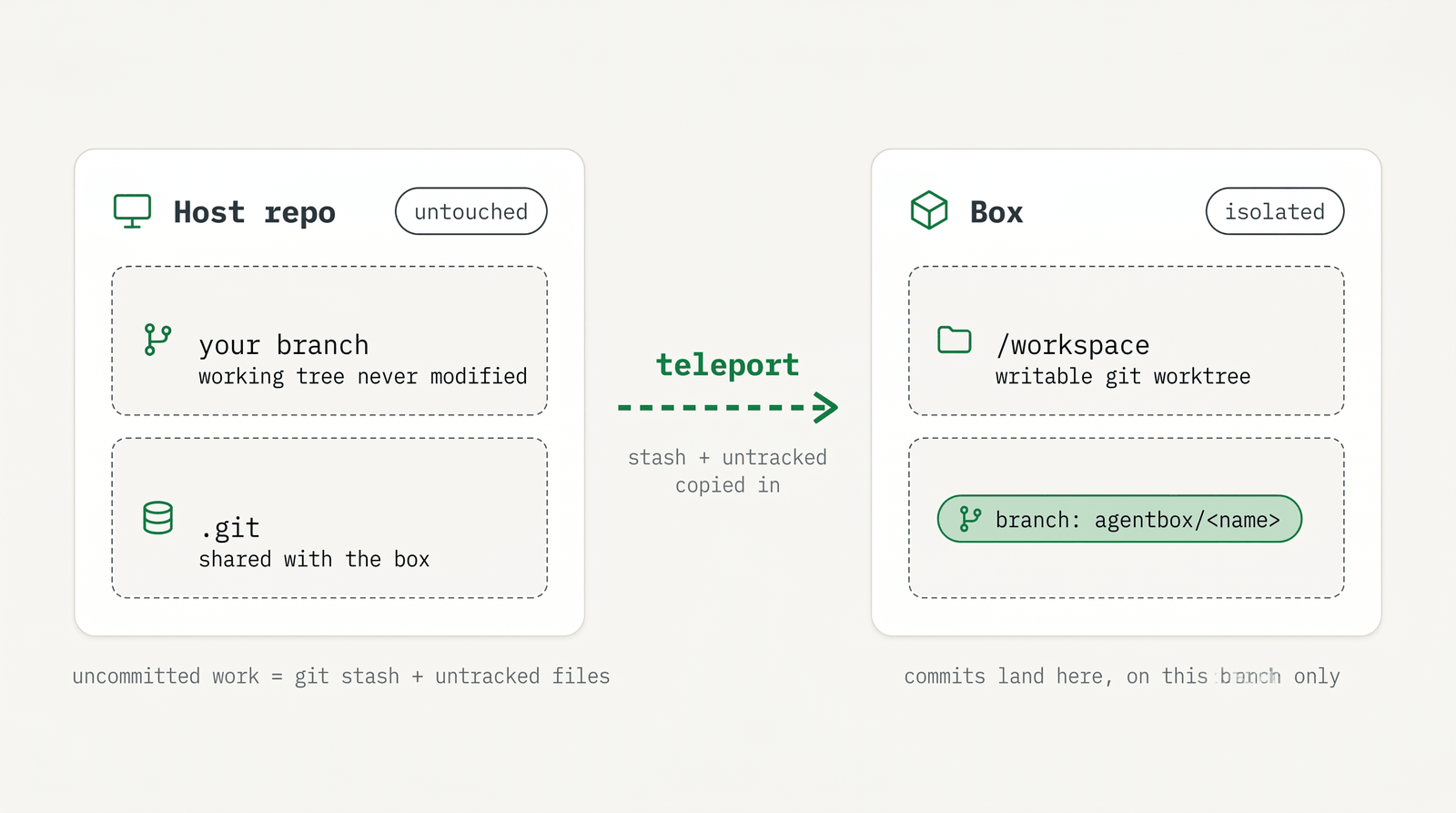
agentbox create copies your project, git history included, onto its own branch
inside an isolated box. Your host checkout stays exactly as it is, and your
machine keeps the credentials.
This page explains that teleport mechanism. In practice you usually don't run
agentbox create directly — run agentbox claude, agentbox codex, or
agentbox opencode instead. They teleport your project exactly the same way
(every flag on this page works with them) and then launch the agent in one step,
so the examples below use agentbox claude. Reach for plain agentbox create
only when you want the box on its own, with no agent.
See core concepts for the box, worktree, and branch model, and run an agent for the agent commands.
Create a box
From your project directory, agentbox claude (or codex/opencode) provisions
one isolated box — a local Docker container, or a remote sandbox with
--provider — and launches the agent. It detects git repos, picks a fresh
per-box branch, captures your uncommitted work, starts the box, and seeds
/workspace. Plain agentbox create runs the same provisioning without
launching an agent.
agentbox claudeName the box with -n, --name (the default is <workspace-basename>-<id>), and
choose where it runs with --provider:
agentbox claude -n my-feature
agentbox claude --provider hetzner   # or daytona, vercel; local docker is the default
Refer to a box later by index (1, 2), name, or id prefix. See
CLI commands for all flags.
TIP
agentbox claude, agentbox codex, and agentbox opencode provision the box and launch the
agent in one step — these are what you'll normally run. Use plain agentbox create when you want
just the box, with no agent. See run an agent.
The setup wizard
The first time you create a box in a project that has no agentbox.yaml, AgentBox
runs a short setup wizard, so you don't configure anything by hand. It does two
things:
- Imports your local env files. It scans for
.env*,.envrc, and similar files and asks which to copy into the box. These are usually gitignored, so they wouldn't reach the box otherwise. (Pass--with-envto skip the prompt and bring them all.) - Writes
agentbox.yamlfor you. It hands the new box to the agent and asks it to inspect your project and propose anagentbox.yaml: a task that installs dependencies and a service that runs your dev server, with a readiness check and the web port exposed. The agent applies it live, so the project sets itself up while you watch.
New project: run setup wizard? Will install dependencies and setup agentbox.yaml
> Yes
You then review the generated agentbox.yaml and commit it (or pull it back with
agentbox download config). Once it's committed, later boxes skip the wizard and
start those tasks and services automatically. A warm
checkpoint skips it too.
HEADS UP
Imported env files bypass .gitignore and put secrets in the box, including cloud boxes. Only
import them for boxes you trust with those values.
For host files outside the env patterns that you want in every box, declare a
carry: block in agentbox.yaml. AgentBox asks once to approve the copy when the
box is created. What agentbox.yaml can declare:
services and tasks and the
agentbox.yaml reference.
How your files get in
On local Docker, the box's /workspace is a git worktree on its own branch
agentbox/<box-name>, backed by your host's .git/, so commits made inside the
box land in your repository immediately. No working copy is written to the host:
/workspace and all build artifacts (node_modules, .next, target, .venv)
live only in the container, survive pause, stop, and start, and are wiped on
destroy. For monorepos, each detected repo gets its own branch.
Cloud providers can't bind-mount your .git, so the workspace is seeded from a
host git bundle instead, and push and pull flow through the host relay.
HEADS UP
The box's /workspace is not a folder on your machine; it lives inside the container. Use
agentbox open or agentbox download to bring files back. See access your
box.
Your uncommitted work comes too
Your uncommitted work is carried over automatically, both tracked changes and
untracked files, so the agent starts from exactly the state you'd see in
git status, on a fresh branch. Gitignored files are the one exception, which is
what the wizard's env import and the carry: block are for.
WHY
Carry-over is non-destructive. It never alters your host working tree or stash list, so your machine looks the same after creating the box as before.
Choosing a branch
Each box gets a fresh per-box branch agentbox/<box-name>, forked from the host
HEAD. Pass --from-branch <ref> to fork from a different branch, tag, or SHA,
or -b, --use-branch <name> to reuse an existing branch. See
CLI commands for all flags.
agentbox claude --from-branch mainTeleport a session (fork)
You don't have to start from scratch. You can fork your current agent session
into a fresh box and continue it there, with the full conversation (and an active
plan) intact. The quickest way is the /agentbox skill or ! agentbox fork from inside Claude Code,
Codex, or OpenCode; on the host it's agentbox fork. See
run an agent for the details.
For eg:
/agentbox hetzner
! agentbox fork vercel # or docker, etc.
Pushing and pulling
Commits the agent makes land on the box's branch in your real .git. To push,
pull, or open a pull request, the box goes through the host relay, which runs git
with your credentials so keys never enter the box. See
sync and git.