
Browser & screen
Give the agent a browser and watch the box's desktop over noVNC
Every box ships a real headed browser and a live VNC desktop. A coding agent can navigate sites, test its own web app, and you can watch it happen — the app it opens is exposed per web-apps-and-tunnels, and the desktop runs alongside the agent from run-an-agent.
Give the agent a browser
Vercel's agent-browser is baked into the box image, so every box (docker, daytona, hetzner, vercel) has a working browser with no setup. On x86_64 boxes (every cloud provider, and docker on an Intel/AMD host) that browser is full Google Chrome, baked into the image. arm64 boxes (docker on Apple Silicon) have no Chrome build, so there agent-browser drives Playwright's Chromium — fetched on first browser use and reused from the project's own pinned Playwright build when present, so agent-browser and the project's Playwright share a single, current Chromium rather than a stale baked-in one.
The agent calls agent-browser directly from inside the box, and any GUI process renders to the box's VNC display — which is what you see through agentbox screen below.
agent-browser is the default, but it isn't the only stack: the standalone playwright-cli is also available for agents that prefer driving Playwright directly. Add it with --with-playwright (or pin it via the browser.default config key) — see Playwright below.
# inside the box (the agent runs these directly)
$ agent-browser session list
No active sessions
$ agent-browser open --headed https://example.com
--headed matters: agent-browser defaults to headless, which renders nothing on the VNC display.
TIP
The agent calls agent-browser itself — you don't have to. Sessions, auth, and cookies persist
under ~/.agent-browser/, surviving pause/unpause and stop/start, and are only wiped on
agentbox destroy.
Links the box opens
When something inside the box opens a URL — agentbox-ctl open, or anything that goes through xdg-open / $BROWSER (an agent's OAuth sign-in, gh, git web--browse) — it lands in the box's own browser and in yours.
That second half needs no approval: opening a link is part of the safe host-action subset (box.autoApproveSafeHostActions, on by default), so the tab just appears. It is rate-limited instead of gated — 2 links per 30s and 10 per 10 minutes per box, and an identical link repeated within 30s is dropped — so a looping agent can't bury you in tabs. Past that budget the link arrives as an Open link card in the attach footer, agentbox dashboard, the hub UI, or the menu-bar app, and opens when you take it.
The link opens on your machine, not on whatever machine the relay runs on. With a remote hub the two are different computers, so the link is offered to whichever surface you're actually at; exactly one of them opens it, however many are watching. With nothing attached and the hub running locally, it just opens.
Set box.autoApproveSafeHostActions=false to be asked about every link (and every other host action).
Playwright
The Playwright runtime ships in the image; a project's own Playwright tests use the Chromium that project pins, which the project installs itself (npx playwright install chromium; on arm64 boxes agent-browser's first launch does it and shares that same binary, so nothing version-mismatched is baked in). Add --with-playwright to also install the standalone Playwright CLI in the box:
agentbox claude --with-playwrightTo make it the default, set the browser.default config key. See configuration for the browser-stack keys and precedence, and CLI commands for all flags.
Live screen
Every box runs a noVNC desktop. agentbox screen <box> opens that viewer in your host browser, auto-unpausing paused boxes and starting stopped ones first. The per-box VNC password is embedded in the URL, so you land straight on the desktop.
agentbox screen myboxThe desktop has a window manager, the AgentBox wallpaper (paper to every edge with the logo centred, whatever size the desktop is), and a small icon dock centred on the bottom edge. Everything on it is in the wallpaper's palette: the dock, the window titlebars, and the terminal, which opens light (ink on paper) with an ANSI palette to match. The dock carries: a Terminal button, a Browser button, and one icon per open window. Click an icon to raise that window, drag titlebars to move them, Alt+Tab to cycle; the browser runs undecorated (it is always maximized, and its tab strip already carries the title), so right-click its dock icon for the window menu. Nothing to enable — it's part of the desktop whenever VNC is on. The Browser button opens a browser of your own, separate from the agent's, so clicking it never navigates the page the agent is working on.
A launch puts a small progress window on the desktop (on an arm64 box the first one also has to download its Chromium, so it is not instant) (and an entry in the dock) that counts the seconds and closes itself once the browser is up. A launch that fails leaves that window open with the error in it. The same window appears when agentbox screen or the hub opens a box's browser for you, so an empty desktop always tells you whether something is on its way.
screen is distinct from agentbox url: url opens the box's web app; screen opens the desktop viewer. See CLI commands for all flags (--print, --loopback, --ttl).
Opt out at create time with --no-vnc:
agentbox create --no-vncHEADS UP
--no-vnc disables the desktop for the box's whole lifetime — agentbox screen then refuses with
a "VNC is disabled" message. Recreate the box to re-enable it.
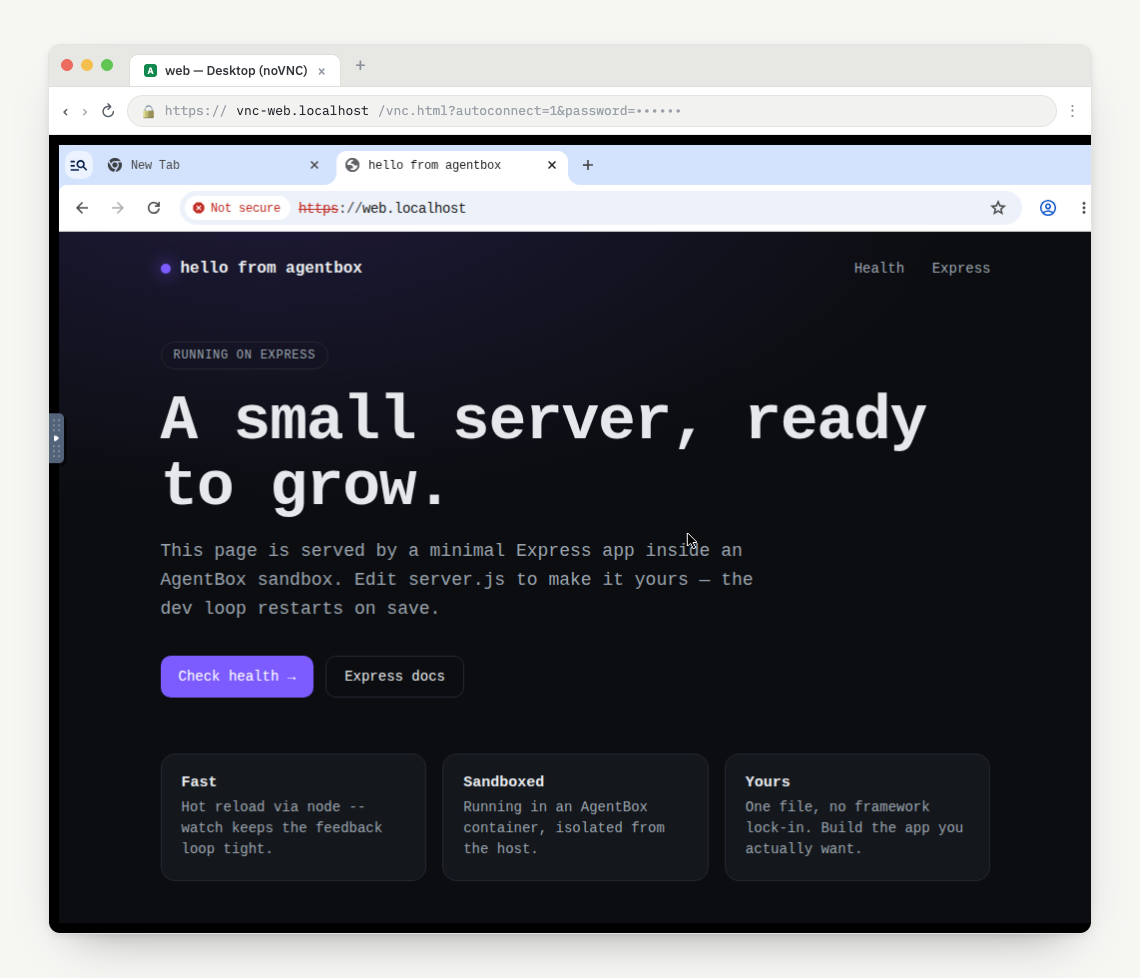
This works end-to-end on the cloud providers too (daytona, vercel, hetzner): the same noVNC desktop, reached via the provider's preview URL. The desktop is reachable from every surface — the (VNC) link in agentbox ls, the tray's Open VNC, and the hub UI — not just agentbox screen.
On daytona, vercel and e2b the viewer URL is minted per click rather than stored: those
providers' signed preview URLs expire (an hour by default), so a URL printed into a box listing
would be dead by the time you clicked it. The hub mints a fresh one on demand (GET /api/v1/boxes/ {id}/vnc), which is why the box payload's vncUrl is null for them while vncEnabled is
true. Docker and hetzner boxes have a stable Portless URL and carry it directly.
Screen sharing
agentbox screen does more than open the noVNC viewer. When the box has a web service that declares expose:, it also opens a headed browser inside the box pointed at the box's own web app — so you land on the running app rather than an empty desktop.
It's idempotent: if a browser session is already active (the agent is mid-task), screen leaves it untouched and never navigates the agent's page away.
agentbox screen mybox          # noVNC viewer + opens the web app inside the box's desktop
agentbox url mybox             # open the web app host-side
The most useful part is one origin from both sides: the in-box browser loads the same URL the host uses, so Next.js allowedDevOrigins, OAuth, and CORS behave identically on both sides. This holds across engines and cloud providers (see local-docker for the Portless vs OrbStack details).
From agentbox dashboard, the same two actions are chords on the selected box: Ctrl-a s (screen — noVNC viewer + in-box browser) and Ctrl-a u (url — web app host-side). They shell out to agentbox screen / agentbox url, inheriting the same Portless behavior.
TIP
Run agentbox screen while the agent is working and you'll see exactly what its browser sees.
The expose: service that makes the web app reachable is covered in services-and-tasks.