
Sync & git push
Get untracked work back to the host and reach remotes through the host relay with explicit approval
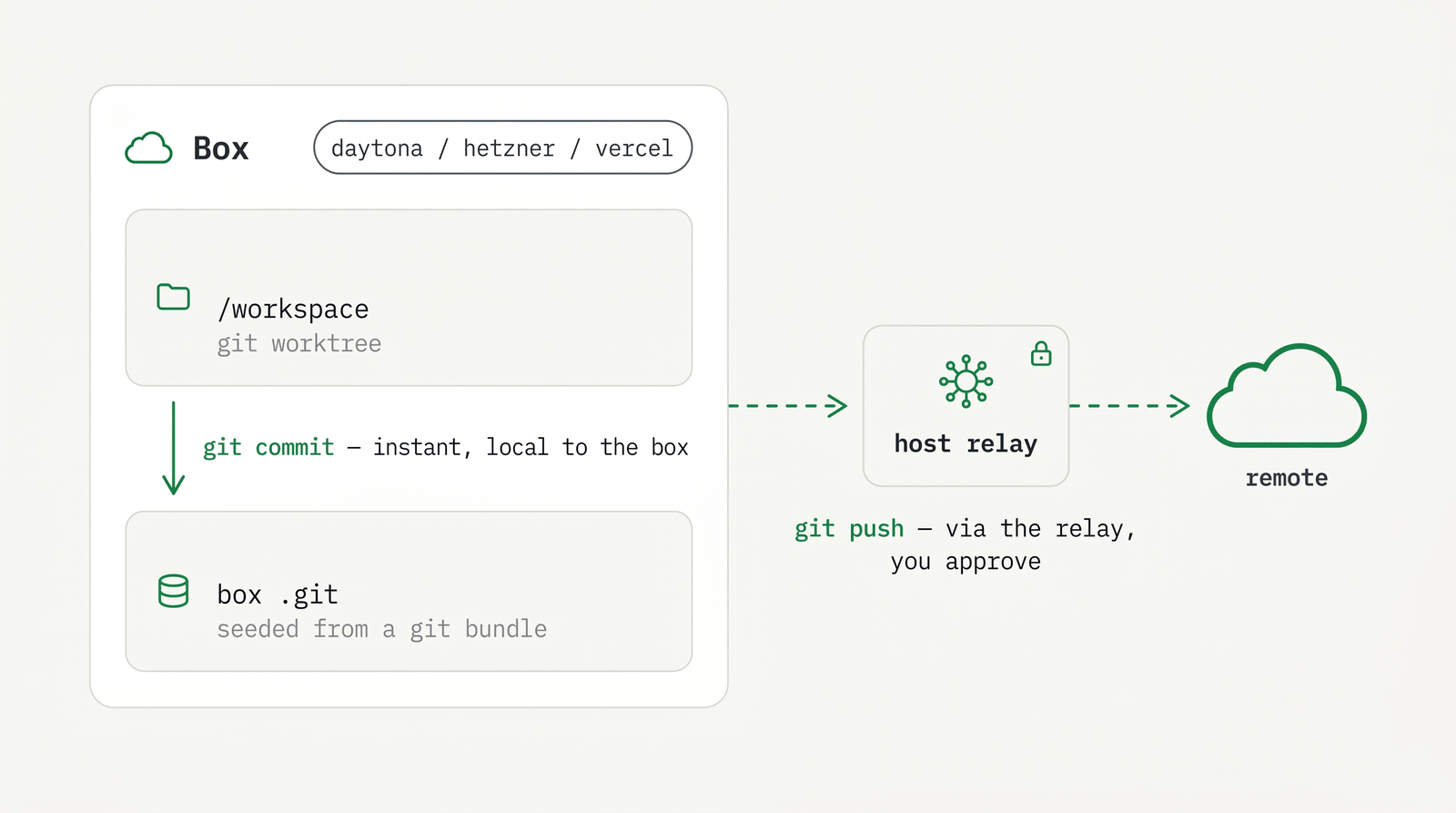
Commits made inside a box land on your host the instant the agent runs git commit. The box's /workspace is a git worktree on branch agentbox/<box-name> against the same .git/ that is bind-mounted from your host, so committed work needs no sync step. See core concepts for the worktree model.
Two things do not cross automatically: untracked files (gitignored artifacts, env files, build output) and anything that needs your credentials — git push, git fetch, and pull-request operations. SSH keys and tokens never enter the box. This page covers both: pulling untracked work back to the host, and reaching the network through the host relay.
TIP
Tracked commits are already on your host. You only need the tools on this page for untracked files and for anything that talks to a remote (push, fetch, PR ops).
Download your workspace
agentbox download [box] copies /workspace from the box back into your host workspace. It is gitignore-aware by default — it brings down tracked and relevant files while respecting .gitignore.
The [box] argument is optional and defaults to the box for the current project (or pass an index, name, id-prefix, or container). The command prompts for confirmation and shows a change list; --dry-run prints that list and exits without writing, and -y skips the prompt.
# Pull the box workspace back to the host (gitignore-aware), with confirmation
agentbox download

# Preview the change list without writing anything
agentbox download --dry-run

# Target a specific box, skip the prompt
agentbox download 2 -y
Gitignored env and config files are excluded by default. Use --with-env to also pull them, or the narrowing verbs download env and download config to scope to env files or agentbox.yaml only. See CLI commands for all flags.
# Also bring down gitignored env/config files
agentbox download --with-env
TIP
Run agentbox download --dry-run first to see exactly which files would change on the host before
committing to the copy.
Back a bot up
agentbox download --backup [box] captures a box as a set of files that can recreate it — on any provider. A checkpoint cannot do this: it is a provider-native snapshot and does not travel from E2B to Hetzner.
The bundle lands in your project, under .agentbox/bots/, and holds both halves of what a bot is:
agentbox download --backup ada<project>/.agentbox/bots/ada/
latest -> 2026-09-07T15-09-16Z
2026-09-07T15-09-16Z/
manifest.json # agent, provider, box, and what was captured
workspace/ # the box's /workspace, same selection a normal download uses
state/ # the agent's state dir, IDENTITY INCLUDEDBackups are timestamped and the newest three are kept; --keep <n> changes that. --name <bot> names the bot when it differs from the box name, and --agent <id> picks the agent when the box's own is not what you want captured.
A backup holds the bot's identity
state/ contains the gateway auth token and channel pairings — everything that makes this bot
this bot, which is exactly what a restore needs and exactly what must not be shared. AgentBox
adds .agentbox/ to your .gitignore on the first backup and writes the directory 0700. Do not
commit it, and do not put it on a shared drive.
Live databases are captured through SQLite's own online-backup API rather than copied byte for byte, because a copy of a database with an active write-ahead log is a torn read. On a real gateway that is the difference between a 3.2 MB file that opens and a 1.5 MB one that has lost the last 1.9 MB of writes.
Unlike a plain download, a backup never asks about agent-generated files: SOUL.md and IDENTITY.md are the point of one.
You can do the same thing without a terminal. The hub's box page shows a Bot card with Back up now on any box whose agent has an identity to keep, and the menu-bar app has Back Up Now in a box's submenu and its detail window. Both go through the same POST /api/v1/boxes/{id}/backup and write the same bundle, on the hub's machine.
Watch for "workspace only"
The state half is best-effort: a box whose agent cannot be reached still produces a usable
workspace bundle, and the manifest records state: false. Both UIs report that as a warning
rather than a success, because such a bundle will start a bot — it just will not restore this
one. agentbox download --backup prints the same thing as a note: line.
Bring a bot back
--restore <bot> is the other half. It creates a new box from a backup:
agentbox openclaw --restore ada                       # the newest backup
agentbox openclaw --restore ada --stamp 2026-09-07T15-09-16Z
agentbox openclaw --restore ada --provider hetzner    # and on another provider
On a service-agent command the restore covers both halves — the workspace and the captured state directory — so the bot comes back as itself: same gateway token, same channel pairings, same history. On agentbox create --restore ada you get the workspace only, and the command says so, because a box created without an agent has no agent state directory to restore into.
The restored box does not run on the backup itself. That copy is immutable, and --keep may prune it, so a box writing into it would eventually lose its workspace to a later backup. It runs on a live sibling, <project>/.agentbox/bots/<bot>/workspace, which --into <dir> overrides.
Two boxes cannot share one identity
A restore is refused while the box the backup came from is still running: two live gateways
holding one identity is exactly what a per-box state directory exists to prevent. Stop or destroy
the old box first, or pass --force if you know what you are doing.
Both GUIs put this in their Create box form rather than on a box: a bundle outlives the box it came from, so by the time you want one there is usually no box left to click. Pick a project that holds a backup and a Start from row appears; choosing one drops the rows the bundle decides (base branch, agent, the setup wizard) and turns the button into Restore. Only backups that carry an identity are offered — a workspace-only bundle would start a fresh bot, which is what clone already does.
The identity goes in after the box has come up on its own, not before. A service agent's onboarding is a run-once task whose marker lives on the box's root filesystem rather than in the agent's config volume, so it runs on every fresh box no matter what that volume holds — there is no "write the state in first" that works. Letting it run and then replacing what it wrote means the marker is already down, and onboarding never touches the restored identity again, on that boot or any later one.
`.agentbox/` never crosses the box boundary
Your project's .agentbox/ is yours and stays on the host — it is never seeded into a box. The
box's own /workspace/.agentbox/ is generated fresh every boot and is never pulled back. Same
name, opposite direction, deliberately.
Exclude-list mode
When /workspace is not a git repo — a service box, a scratch folder, anything you created with
agentbox create in a plain directory — there is no .gitignore to consult, so download selects
files with an exclude list instead. It is not a degraded fallback: for those boxes it is the normal
mode, and the output says so.
The list drops .git, node_modules, media/, live databases (*.sqlite*, *.db, *.db-*) and
every agent's state directory (.claude, .codex, .config/opencode, …). Live databases are never
safe to copy — the main file without its write-ahead log is a torn read — and an agent's state
directory belongs to the box, not to your project folder. --no-respect-gitignore forces this mode
even in a git workspace.
node_modules is left in the box in both modes, and --include-node-modules is the single
switch that overrides that. It used to be excluded only by your .gitignore, so a repo that does
not ignore it had the box's copy pulled back — a Linux-built node_modules landing on a macOS
checkout, and, because the staged copy never contained it, a download that failed outright.
Files an agent generated in the workspace — openclaw's AGENTS.md, SOUL.md, IDENTITY.md and
USER.md, which it writes because its workspace is your project — are neither dropped nor copied
silently. If your project does not already have one, download asks before bringing it in;
--include-agent-files answers yes up front, and with -y they are skipped and named. A file you
already have is never questioned: it is yours, and the download just updates it.
agentbox download --dry-run
# >f+++++++++ made-in-box.txt
# >fcst...... src/app.js
#
# [dry-run] 2 file(s) would change in /srv/gateway (exclude-list mode)
This works identically on every provider. A cloud box has no bind mount, so it tars the selected
files out over the provider connection instead of rsyncing over one — but the change list,
--dry-run and the gitignore/exclude selection are the same code on both sides.
Push your workspace into a box
agentbox upload [box] is the other direction: it pushes your host workspace into a live box.
Useful when the box is long-running (a service, a gateway) and you have edited config or content on
the host that the box should pick up without being recreated.
# Push the host workspace into the box for this project
agentbox upload

# Target a specific box
agentbox upload svc
The box always wins. A git workspace merges your branch into the box's branch and overlays your uncommitted and untracked changes; a non-git workspace gets a plain file overlay. In both cases a file the box has changed is left alone and reported — nothing in the box is overwritten, and no branch is ever reset. That matters because this runs against a box that may have an agent working in it right now.
sync: 1 copied, 3 unchanged, 1 kept by the box
▲  1 host change(s) were SKIPPED to keep the box's version:
     README.md
To take the box's version instead, run agentbox download — the two commands are exact mirrors.
Clone a box
agentbox clone <box> stands up a second box from the same workspace files and the same
agentbox.yaml, with a fresh agent identity.
# New box "svc2" from svc's current workspace
agentbox clone svc --name svc2

# Clone onto a different provider, into a directory you choose
agentbox clone svc --name svc-hz --provider hetzner --into ~/projects/svc-hz
The clone gets its own host workspace directory, exported from the source box with the same
gitignore/exclude rules download uses. When the source box belongs to a project, that directory is
<project>/.agentbox/bots/<name>/workspace/ — beside the source bot's own backups, in the same
gitignored tree — so a project is the template and its bots are instances of it. A box with no
project falls back to ~/.agentbox/clones/<name>, and --into <dir> overrides either. That
directory is a real project: agentbox upload pushes into the clone and agentbox download pulls
back out of it, like any other box.
What is not copied is the agent's config volume and its credential. The new box onboards from
scratch, so it generates its own identity and carries no pairings or sessions from the source. There
is deliberately no --with-state: two live daemons sharing one identity is the failure this design
exists to prevent. To move a box's full state somewhere else, use a
checkpoint instead.
.git is not exported either — the clone is a template, not a second checkout. If you want a
git-backed second box on the same project, that is what agentbox create already gives you.
A clone of a box running a service agent — a bot, like OpenClaw — runs that
same agent, because a bot's box is the bot and an agentless copy of its workspace is just a
directory. A clone of a coding-agent box is still created without an agent: there is no identity
to reproduce, so start one with agentbox claude <clone> and it logs in as its own box.
What a spawned bot gets of its own
An agent declares three things about its own clones, and AgentBox applies them:
| Declared | What the clone does |
|---|---|
drop | Files the agent regenerates are not copied (OpenClaw's AGENTS.md, USER.md) |
render | Files that name the bot are copied, then rewritten for the new box (SOUL.md, IDENTITY.md) |
perBoxCarry | A per-box secrets file the clone will not start without |
The rewrite uses a replacements: rule-set named identity in
the workspace's own agentbox.yaml, so you decide which words are the bot's name:
replacements:
  identity:
    - from: '\bAda\b'
      to: '{{AGENTBOX_BOX_NAME}}'
      regex: true
The bot can write this itself — an OpenClaw box is nudged, on its first turn, to follow its
agentbox-identity skill and propose the rules for you to review. Without a rule-set the files are
copied verbatim, and the clone says so.
The per-box file is the part that refuses. OpenClaw declares
~/.agentbox/openclaw/<box-name>.env, so each bot reads its own channel tokens:
agentbox clone ada -n bea
# clone: bea needs its own secrets before it can be a separate bot —
#   create /Users/you/.agentbox/openclaw/bea.env (0600) and run this again
Nothing is created when it refuses — no directory, no box. On an ordinary
agentbox openclaw -n <name> the same file is optional (a first bot has nobody to collide with) and
its absence is only logged. A clone is where the collision would actually happen, so there it is a
refusal: two bots sharing one Telegram token means the copy answers as the original.
Sync agent settings between boxes
Installed a skill or plugin inside a box and want it everywhere? agentbox download claude [box] pulls box-installed Claude skills/plugins/agents/commands back to your host ~/.claude (additive — nothing on the host is ever overwritten), and then offers to propagate them to your other boxes: same project, all boxes, or none. download codex, download opencode and download pi do the same for their config/auth files. Works on every provider: docker boxes are read from their config volume (even while stopped), cloud boxes from the live box (auto-resuming a paused one).
# Pull new skills/plugins from a box into host ~/.claude, then choose:
#   Propagate to other boxes? › same project / all boxes / no
agentbox download claude mybox

# Non-interactive: pull and push to every box in this project
agentbox download claude mybox --propagate project -y

# Preview only
agentbox download claude mybox --dry-run
Propagation is additive per target: docker boxes get one write to their shared config volume (covering paused ones too), running cloud boxes are pushed over the provider transport, and Claude's plugin registries are merged without touching entries a target already has. Paused cloud boxes are skipped with a note — resume them and re-run to include them. Declining the host write doesn't block propagation: the items are staged from the source box either way.
Cloud boxes (--provider daytona, vercel, hetzner) do a bulk tar pull of /workspace and do not support gitignore-aware change detection or --dry-run. On cloud, the git-aware sync-back path is in-box git push. See Daytona, Vercel, Hetzner.
Copy files
agentbox cp <paths...> is a one-off file copy between host and box, modeled on docker cp. Direction is inferred from which side carries the box: prefix (a : not preceded by /): box:/path sources download, a box:/path destination uploads. The last path is the destination; everything before it is a source.
# Download a single file into the current directory
agentbox cp mybox:/workspace/.env

# Download to an explicit host path
agentbox cp mybox:/etc/foo ./foo

# Upload a file into the box (host path required)
agentbox cp ./local.txt mybox:/workspace/

# Upload a directory (recursive)
agentbox cp ./dir mybox:/workspace/

# Many sources at once into a destination directory
agentbox cp a.txt b.txt src/ mybox:/workspace/dest/

# A shell-expanded wildcard (your shell expands it before agentbox runs)
agentbox cp ./*.log mybox:/workspace/logs/
On download the host path is optional and defaults to the current directory; on upload it is required. With two or more sources the destination must be a directory (end it with /). Directories copy recursively and preserve mode; uploaded files are re-owned to vscode (uid 1000). The box auto-unpauses if needed.
Wildcards are expanded by the shell you type the command in, so cp ./*.log box:/dst/ works from the host and cp box:/workspace/*.log ./ works from inside the box (agentbox-ctl cp toHost). A box-path glob typed on the host can't be expanded (the host shell can't see the box filesystem) — list the files or run it from inside the box.
HEADS UP
Exactly one side must carry the name: prefix, and all sources must be on that one side.
agentbox cp ./a ./b (neither side) or agentbox cp box:/a box:/b (both sides) is a usage error,
and box sources must all name the same box.
Push & pull via the relay
The box has no git credentials — no SSH keys, no tokens. Anything that hits a remote runs on the host relay, a small process on your machine that executes git with your real SSH agent and ~/.gitconfig, then streams output back into the box.
From the host you run agentbox git <sub> <box>. Inside the box, plain git already does the right thing: a small git shim on the box's PATH transparently routes the four network ops — push, pull, fetch, clone — through the relay (the explicit equivalent is agentbox-ctl git <sub>). Local ops — commit, status, add, log, diff, … — fall through to real git and run normally against the box's checkout. Since commits are already local, push is the op that truly needs the relay; pull is a relay fetch plus a local merge in /workspace.
# Push the box's branch to its remote
agentbox git push 2

# Fetch + merge inside the box's /workspace
agentbox git pull 2

# Switch the box onto main and pull latest (reuse the box for a new task)
agentbox git pull 2 main

# Land the box's branch in your LOCAL repo without publishing it
agentbox git push 2 --host-only
agentbox git push 2 --host-only --as feat/login   # ...under a chosen name
Passing a branch to pull checks it out, then pulls latest — the clean way to rebase a box onto a fresh base and reuse it for a new task. For all flags and the local checkout/status ops, see CLI commands.
Which flags the in-box shim accepts
The relay builds the remote and branch itself from the box's registered worktree, so the shim refuses them as positionals (git push, not git push origin main) and accepts a small set of flags per op:
| Op | Flags |
|---|---|
push | --force-with-lease, --tags, --dry-run |
pull | --ff-only, --prune/-p, --tags/--no-tags |
fetch | --prune/-p, --prune-tags, --tags/--no-tags, --force/-f, --dry-run |
clone | --branch <name>, --depth <n> |
A clone whose source is unmistakably local (a file:// URL or a filesystem path) needs no host credentials, so it falls through to real git before the gate.
All of push/pull/fetch additionally take --quiet/-q, --verbose/-v, and --progress/--no-progress. Anything else exits 2 with unsupported flag '<x>'. Flags that would rewrite or delete remote refs (--delete, --mirror, push --prune, push --force) stay off the list on purpose — use --force-with-lease for a force-push.
Keep the branch on your machine, not online
git push --host-only makes the box's branch available in your host repo without pushing to any remote — nothing is published online. Use it when you want to git checkout the box's work locally, keep iterating on the host, or review it before deciding whether to publish. It defaults to the box's own branch name; pass --as <branch> to land it under a different name, and --force to allow a non-fast-forward overwrite. From inside the box the agent can do the same with agentbox-ctl git push --host-only. Because nothing leaves the host, this skips the push-approval prompt that a real git push triggers.
For HTTPS remotes, run gh auth login and gh auth setup-git on the host once so plain git push uses gh's token via git's credential helpers — no relay change needed. See teleport a project.
HEADS UP
Plain git push inside the box just works: a git/gh shim routes network ops through the host relay, which runs them with your credentials and asks you to approve writes. Keys and tokens never enter the box. (Use a bare git push, not git push <remote> <branch>.)
How the push reaches GitHub — git.pushMode
There are three ways a box's git push can reach your remote:
- Relay (the default above) — the box asks the host relay to push, and the host runs
git pushwith your own credentials. They never enter the box. Docker boxes always use this (they bind-mount your.git); cloud boxes run it through the relay's cloud poller (a git-bundle pull-back). - Lease — when a control plane is configured for a cloud box, the relay/plane leases a short-lived, repo-scoped GitHub-App token and the box pushes directly with it, so the box keeps working with your laptop off.
- Direct — the box holds a copy of your git credentials and pushes/pulls/signs entirely on its own — no host, no hub. See Independent boxes below. Refused when a control box is configured (
relay.controlPlaneUrl): leasing already does the laptop-off push without the credential copy, so uselease/autothere.
auto (the default) leases when a control plane is configured for the box, and uses the relay otherwise. Force one with the git.pushMode config key:
agentbox config set git.pushMode relay   # always push through the host relay (your creds)
agentbox config set git.pushMode lease   # always lease a token; box pushes directly
agentbox config set git.pushMode direct  # box holds a copy of your creds (see below)
agentbox config set git.pushMode auto    # default (lease iff a control plane is set)
Only affects cloud boxes. Forcing relay needs a reachable host relay for the box; forcing lease needs a reachable relay/plane with a GitHub App configured.
Independent boxes — --dangerously-with-credentials
The relay and lease modes both keep your credentials off the box — but relay needs your PC on, and lease needs a hosted control plane. For a cloud box you intend to leave running unattended (Hetzner, or a pause/resume box on E2B/Vercel/Daytona), --dangerously-with-credentials copies one git credential into the box so it can push and pull on its own, with your PC off and no hub:
Only without a control box
--dangerously-with-credentials (and git.pushMode=direct, and connect --dangerously-git-credentials) is refused when a control box is configured
(relay.controlPlaneUrl). A control box already gives a box laptop-off push through token
leasing — the box leases a short-lived, repo-scoped GitHub-App token on each push
(git.pushMode=auto, the default) — so copying a credential into the box and its snapshots there
is pure downside. It stays available exactly as below only when you have no control box. If
you want the credential-copy behavior on a machine that has a control box configured, unset
relay.controlPlaneUrl first.
agentbox create --provider hetzner --dangerously-with-credentials
agentbox claude  --provider e2b     --dangerously-with-credentials
At create time it asks — at an interactive prompt — which credential to copy. The choice is a security trade-off:
token(recommended) — copies just a GitHub token (read from your git credential helper orgh). The box pushes over HTTPS; a github SSH remote (git@github.com:…) is transparently rewritten to HTTPS, so no SSH key is ever copied. Commits are unsigned. Smallest secret to expose.ssh— copies your SSH private key. The box pushes over SSH and signs commits. This is the riskiest option: use a key dedicated to git, not the key you use to log into other servers.
Inside the box, git push/fetch/pull then run real git against the credentialed remote — the relay is never involved.
Already have a box running? Do the same thing after the fact with agentbox connect <box> --dangerously-git-credentials (Hetzner / DigitalOcean) — the post-create equivalent. It runs the same interactive token-vs-ssh prompt, copies the credential into the live box, and flips it to direct mode. Restart the box's agent session afterward (or open a fresh agentbox shell) so it picks up the new mode — a session already running keeps using the relay until it restarts.
agentbox connect mybox --dangerously-git-credentials   # choose token or ssh
agentbox recover mybox                                  # restart the agent to use it
This copies a real credential into the box
--dangerously-with-credentials places a credential inside the box — where its user has
passwordless sudo (no boundary) — and it is captured in any snapshot or checkpoint of it. Only
use it for a box you trust to run unattended. For safety this is interactive and foreground
only: it requires a real terminal and a human choosing token vs SSH at the prompt. There is
deliberately no non-interactive path — no flag value, no env var, no -y — and it is
rejected with -i / background runs, so automation and CI can't copy a credential without a
person present.
What still needs your PC: agentbox cp/download, checkpoint, and pull-request ops (gh pr create) remain host-relay operations — with the PC off they fail with a clear message rather than hanging. Only git push/fetch/pull are independent. --dangerously-with-credentials is cloud-only (a docker box already runs on your host).
This is about the box's outbound git — it does not open the firewall or make the box reachable. To connect to the box from another device (a phone) with the laptop off, see remote access (agentbox inbound + agentbox connect) — an independent axis you can combine with --dangerously-with-credentials.
Notes: token mode can't sign commits (a token authenticates, it doesn't sign) — pick ssh if you need signed commits. In ssh mode the key must be passphrase-less (there's no ssh-agent in the box); a passphrase-protected signing key leaves signing off so commits never fail.
Pull requests
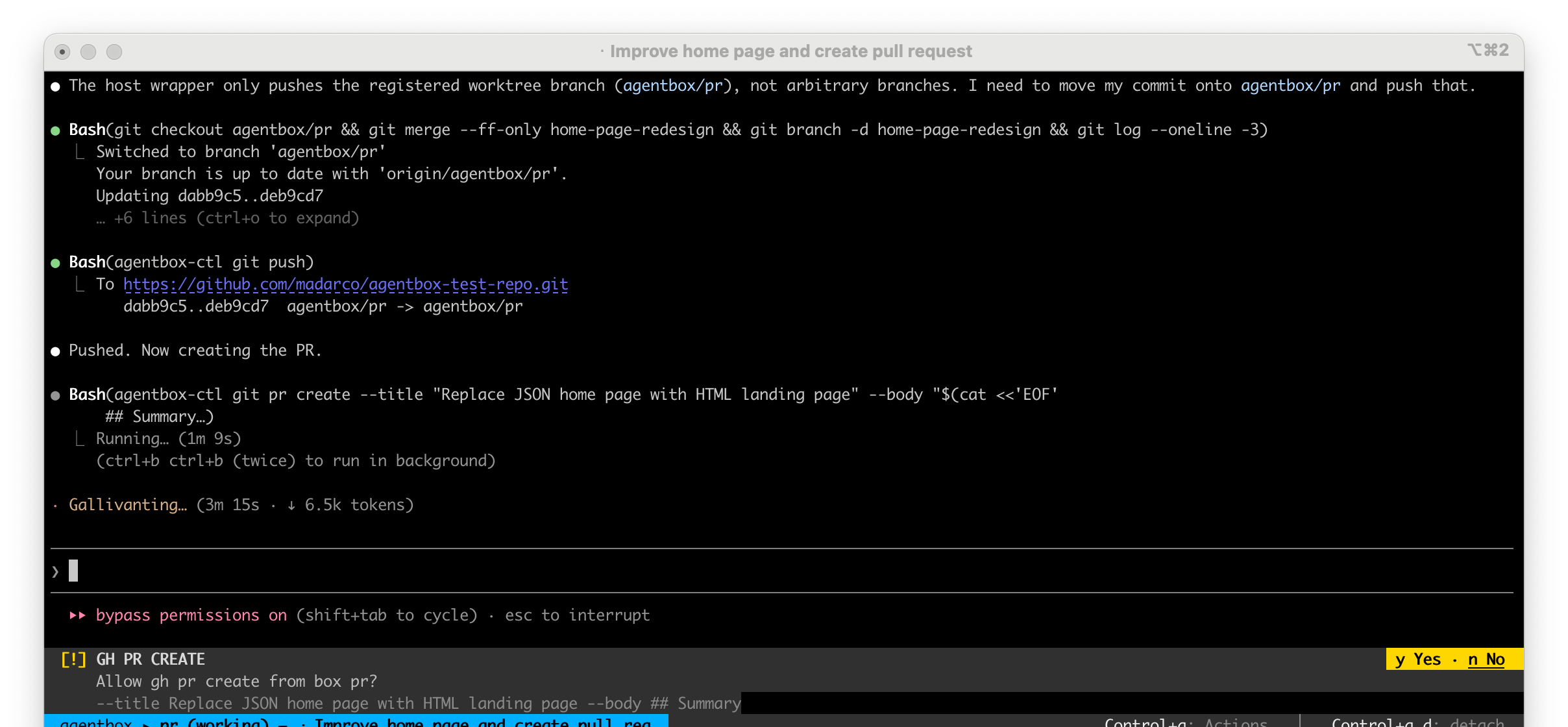
The relay also proxies the host gh CLI: agentbox git pr <op> <box> from the host, or — inside the box — plain gh pr <op>, which the box's gh shim routes through the relay the same way (the explicit form is agentbox-ctl git pr <op>). gh runs in the host main repo and infers the repo from git remote -v. This needs gh installed and gh auth login on the host.
GitHub Enterprise Server: the relay reads the box's registered origin and points gh at that host (GH_HOST), so gh pr, gh run and gh api work against a self-hosted GitHub. Run gh auth login --hostname ghe.your-company.com on the host once — GH_ENTERPRISE_TOKEN works too — and the error names the host if you haven't. github.com repos are unaffected. An ~/.ssh/config alias (git@github.com-work:owner/repo) is expanded the way ssh itself would, so it resolves to the real host rather than becoming a bogus one.
create is the default op, so agentbox git pr <box> opens a PR for the box's branch. The full op set (view, list, diff, merge, comment, …) lives in CLI commands.
# Open a PR for the box's branch (--head defaults to the box branch)
agentbox git pr create 2 --title "Add feature X" --body "..."

# Inside the box
agentbox-ctl git pr create --title "Add feature X"
Git permissions
Only destructive and irreversible actions are blocked; ordinary agent work runs without a prompt (each still logged as a relay event): opening a PR, PR/review comments, merging a PR, re-running CI, checkpoints, file copy/download that stays inside the box project folder (non-secret), and opening a link from the box in your own browser (rate-limited to 2 per 30s and 10 per 10min per box; over that it asks — see browser & screen).
git push follows the same rule. Publishing commits — to the box's own scratch branch, the branch you put it on with agentbox git checkout/branch/pull, or any other branch the agent names — is ordinary, revertable work and runs silently. A push asks only when it does something you cannot undo: deleting a remote branch or tag (--delete, :branch), force-pushing a branch that is not the box's own agentbox/* scratch branch (--force, a + refspec), --mirror/--prune, overwriting a tag, redirecting the push elsewhere (--repo, --receive-pack) — or using any flag the gate does not recognise, which it treats as "ask". --force-with-lease and --force-if-includes are the safe force spellings and stay silent, since they refuse to clobber work they have not seen. The one push-shaped exception is agentbox-ctl git lease-token (hosted control plane): it hands the box a credential it can push anything with, so it asks for any branch but the box's own.
Outside git, gh pr checkout (it moves your working tree) and any file transfer that escapes the project folder or touches a secret (.env, keys, credentials) still raise a host-side approval prompt and proceed only on a y. Read-only ops (status, pr view/list/diff) never prompt. This is the safe-by-default promise: the agent inside the box can act freely within its own sandbox, a human approves anything that reaches beyond it, and the credentials never leave the host. Set box.autoApproveSafeHostActions=false to prompt for every gh, file-transfer and host-tool write op (git push is judged by what it does, so that key does not change it), or box.autoApproveHostActions=true to auto-approve everything, destructive pushes included. See core concepts for the security model and configuration for the keys. Env knobs for unattended boxes (AGENTBOX_GH_NO_SUB, …) are documented in CLI commands and background & parallel.
TIP
Running a remote-write command yourself from the host auto-approves via a one-time token — no second prompt. The prompt exists for when the agent inside the box initiates the action.
Related
- Core concepts — the worktree, shared
.git/, and relay security model - Checkpoints & pausing — a checkpoint preserves the box's full state;
downloadextracts files - Background & parallel — reusing a box via
git pull <branch>;AGENTBOX_GH_NO_SUBfor unattended boxes - CLI reference — full flags for
download,upload,clone,cp,git, andrelay - Configuration — relay management and related config keys