
Herdr
AgentBox in Herdr — boxes appear as normal agents, Herdr handles needs-input natively, AgentBox approval prompts get their own highlight, and boxes open as Herdr splits/tabs/workspaces
Herdr is a terminal multiplexer with a local JSON-RPC socket API. When you run AgentBox inside Herdr, a box behaves like a normal agent pane:
- the box agent (Claude / Codex / OpenCode) shows up with Herdr's native agent treatment — working / blocked / idle
- Herdr's own needs-input handling fires when the agent asks a question, because AgentBox reports the state transparently
- AgentBox's own approval prompts (git push, PR, checkpoint, …) — which Herdr can't otherwise see — get an explicit Herdr notification
- attached sessions open as Herdr splits, tabs, or workspaces via
--attach-in
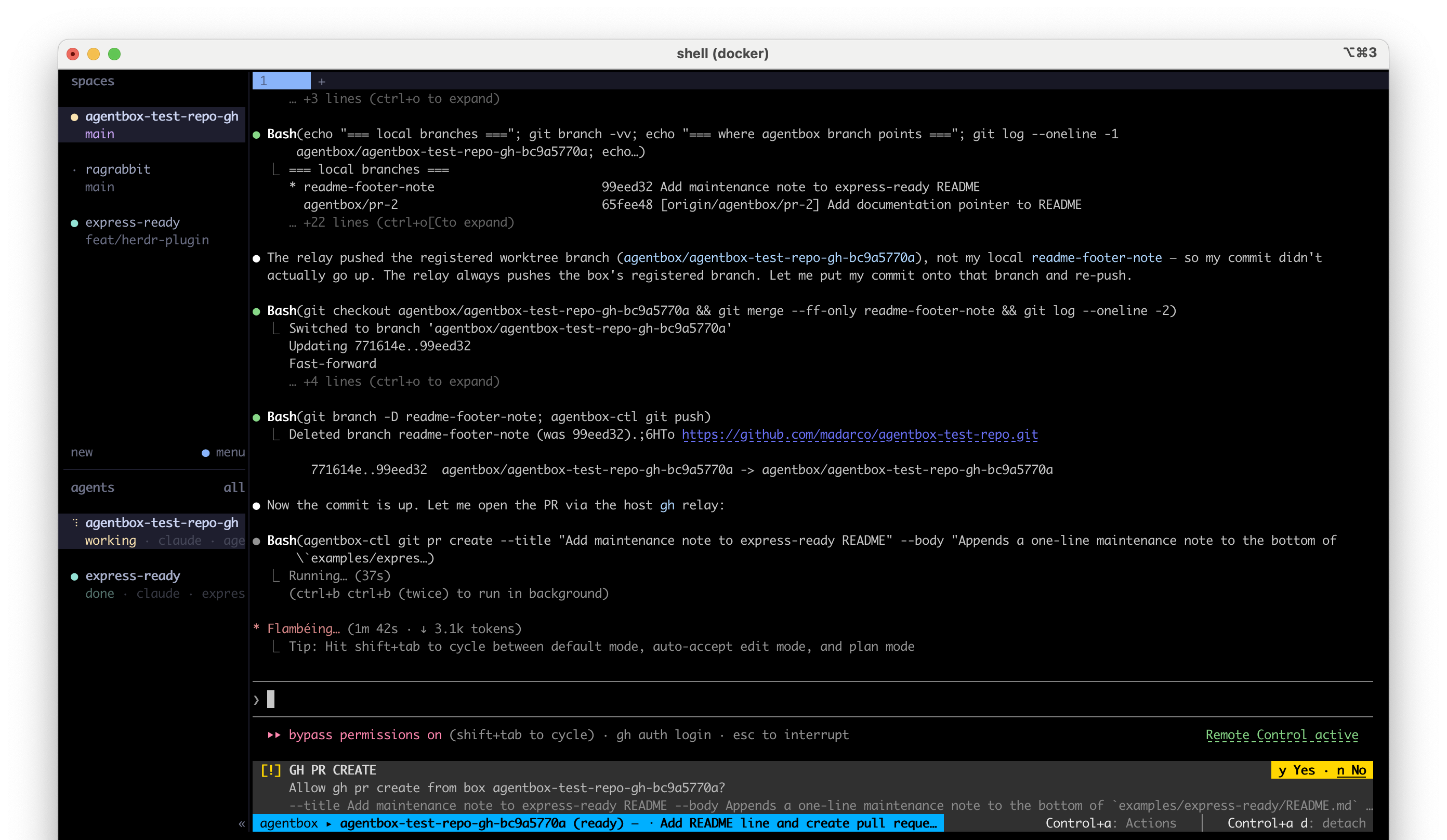
A box looks like a normal agent
While you're attached to a box inside Herdr, AgentBox reports the agent's live activity to its pane (pane.report_agent), so Herdr treats it exactly like a locally-running agent:
| Agent state | Herdr agent state |
|---|---|
| Working / compacting | working |
| Asking a question / waiting | blocked |
| Plan ready | blocked |
| Error | blocked |
| Idle | idle |
Because the box reports as a normal agent, Herdr handles needs-input itself from the blocked state — its usual badge / notification, the same as a local agent. On detach the pane resets to idle. This is controlled by attach.herdrStatus (default true); set it to false to turn it off. It's a no-op outside Herdr.
Why this is the inverse of the cmux integration
cmux won't draw its agent pill for a box (it sees a container process), so AgentBox there drives the workspace colour by hand. Herdr has a first-class agent model and an open socket, so AgentBox simply reports the state and lets Herdr do the rest — including needs-input.
A highlight for AgentBox's own prompts
Some prompts don't come from the agent at all — they come from AgentBox's host relay: approving a git push, a PR, a checkpoint, a file copy. Herdr has no way to know about these, so AgentBox raises an explicit Herdr notification (with the request sound) the moment one appears, titled with the box name. That keeps AgentBox-specific approvals from blending into the normal agent flow.
Boxes as splits, tabs, or workspaces
The attach.openIn config key (CLI flag --attach-in) decides where an attached session lands. Under Herdr the default is a new tab (a split pane is cramped for an attached agent), but you can pick any mode:
| Mode | What happens |
|---|---|
tab (default) | New tab in the current workspace (tab.create) |
split | New split beside the current pane (pane.split) |
window | Separate Herdr workspace (workspace.create) |
same | Inline in the current pane (no spawn) — same as --inline |
The global default is split (for tmux/cmux/iTerm2); Herdr overrides it to tab only when you haven't set attach.openIn yourself. Setting it explicitly — globally or per run — is always honored:
# force a split for this run, even under Herdr
agentbox claude mybox --attach-in split

# change the default everywhere
agentbox config set attach.openIn window
This also works for background -i runs: set queue.openIn and the box opens in Herdr the moment its worker finishes creating it.
How it talks to Herdr
AgentBox detects Herdr from the HERDR_SOCKET_PATH / HERDR_PANE_ID environment variables that Herdr injects into managed panes, and talks to Herdr's socket API directly — there's no extra binary to install. Detection is checked before iTerm2 (Herdr runs inside an emulator, so TERM_PROGRAM reflects the outer one), and every socket call is best-effort: if Herdr is unreachable, the attach is unaffected.
The Herdr plugin
A Herdr plugin adds a boxes overlay, two shortcuts, and a Ctrl+click handler. Install it either way:
From Herdr (discover it there):
herdr plugin install madarco/agentboxThe install runs a build step that finishes setup if the AgentBox CLI is present. If the CLI isn't installed yet, the plugin still installs and prints how to get it:
npm i -g @madarco/agentbox && agentbox install herdrFrom the AgentBox CLI (if you already have it):
agentbox install herdr            # write + link the plugin, add the shortcuts
agentbox install herdr --dry-run  # print everything it would write, change nothing
Both produce the same plugin. Plugin commands route through a small agentbox-shim.sh written at install time with the absolute path to your CLI, so it works regardless of the Herdr server's PATH (including under nvm). Keyboard shortcuts go into your ~/.config/herdr/config.toml (Herdr doesn't take keybindings from plugin manifests). Re-run any time to refresh; remove the shortcuts with herdr config reset-keys.
Boxes overlay + shortcuts
Under Herdr's prefix (default Ctrl+b):
| Keys | What it does |
|---|---|
prefix a | Open the boxes overlay — a live list of all your boxes (agentbox list --herdr --watch), grouped by project. |
prefix shift a | New box — open agentbox in a new Herdr tab for the current project. |
The overlay lists every box (global), including paused/background ones. To open it from anywhere, just press prefix a again — it works from any workspace.
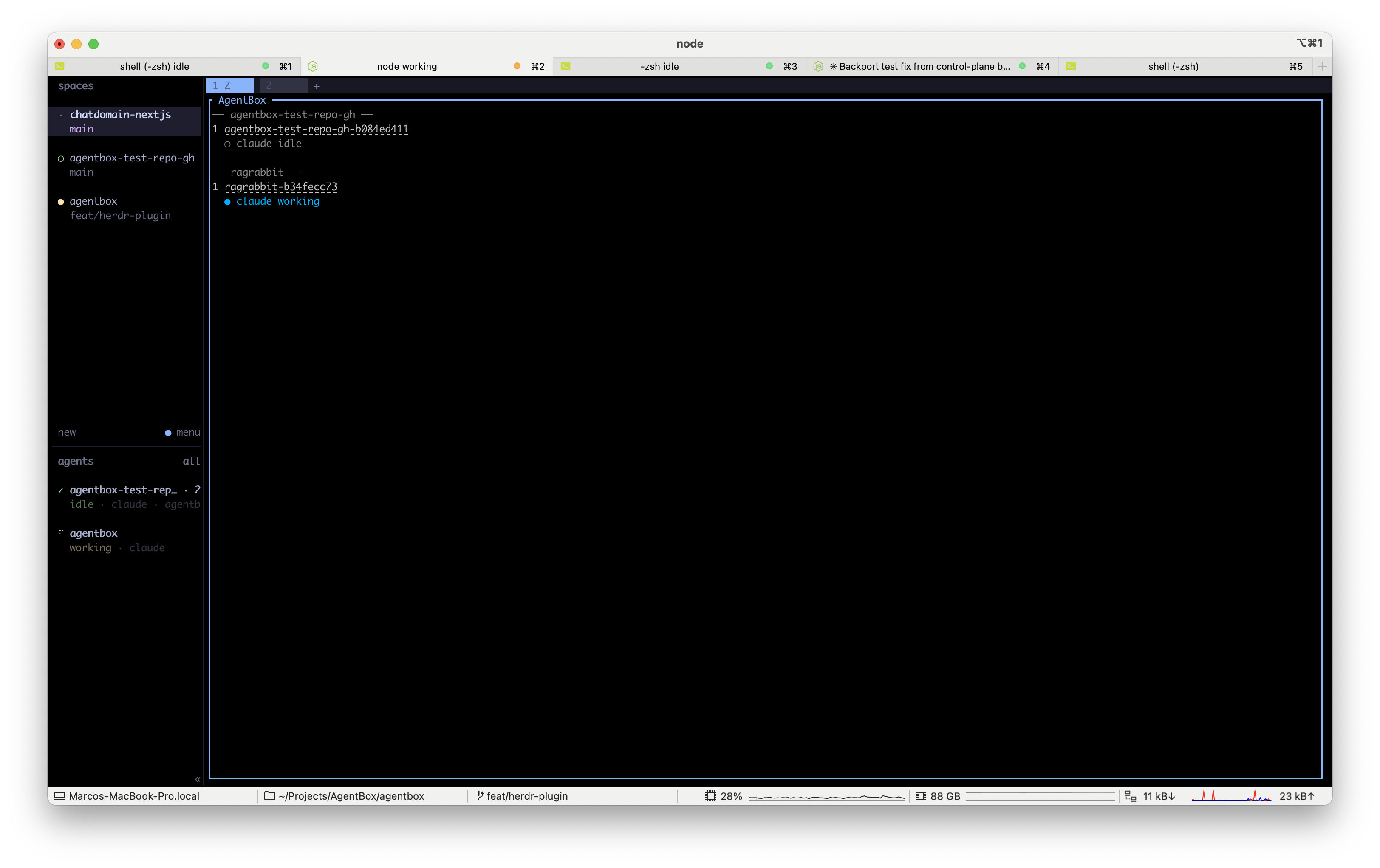
Ctrl+click a box → its web app
In the overlay, each box name is a link. Ctrl+click it to open the box's web app (the service you expose: in agentbox.yaml) in your browser. If the box exposes no web app, Herdr shows a notification and does nothing.
Boxes in the native sidebar (no plugin needed)
Herdr's own sidebar has an agent panel. Set its scope to all (agent_panel_scope = "all" in ~/.config/herdr/config.toml, or toggle it in the sidebar) and every box you're attached to shows up there globally — across all workspaces — because AgentBox already reports each box as an agent (see above). That's the most "always visible" view of active boxes.
Why an overlay, not a pinned sidebar panel
Herdr v1 plugins can't add panels to the sidebar or menus — plugin panes are only terminal panes (overlay/split/tab/zoomed), and the native sidebar only shows boxes with a live pane. So the full roster (incl. paused boxes) lives in the keyboard-toggled overlay, while the native sidebar agent panel covers active boxes.
See Access your box for the other ways to reach a box, and Configuration for the attach.openIn and attach.herdrStatus keys.