
Services & tasks
Declare dev servers and setup steps in agentbox.yaml and let the supervisor run them
Two things called tasks
The setup tasks on this page are commands the in-box supervisor runs — pnpm install, a
migration, a build. They are not the work items in Workspaces &
tasks, which are what you and a manager agent plan and assign to
boxes.
Every box ships with agentbox-ctl, a small supervisor that reads /workspace/agentbox.yaml and keeps your declared services alive while running your one-shot tasks to completion. It starts automatically on agentbox create and agentbox start, so your dev server and setup steps are up before the agent starts work. See core concepts for how the box and supervisor fit together.
agentbox.yaml
The file lives at your project root and is read at /workspace/agentbox.yaml inside the box. Two top-level maps matter here: services: (long-running) and tasks: (one-shot).
# agentbox.yaml — at the project root
tasks:
  install:
    command: pnpm install --frozen-lockfile
services:
  web:
    command: pnpm dev
    cwd: apps/web # relative to /workspace
    needs: [install] # waits for the install task to finish
    ready_when:
      http: http://127.0.0.1:3000/health
For the full set of service and task fields, see the agentbox.yaml reference.
TIP
The setup wizard writes a starter agentbox.yaml for you on first create — see teleport a
project. Hand-edit it afterward.
Services vs tasks
Services are long-running processes — dev servers, workers, databases. They get a restart policy, backoff, autostart, readiness probes, and expose.
Tasks are one-shot units that run to completion, intended to run before dependent services via needs:. A task supports only command, cwd, env, and needs. The canonical task is a setup step like rebuilding node_modules inside the Linux box so host binaries don't leak in.
Crashed services restart with exponential backoff, and per-service output is captured to /var/log/agentbox/<service>.log. A blocked unit sits in waiting and surfaces its blockedOn in agentbox status.
HEADS UP
restart, autostart, backoff, and ready_when belong on services only — putting them under a
task is a config error and fails validation.
Readiness
Gate dependents on a service being live with a ready_when: probe (port, log_match, or http) — see agentbox.yaml. A needs: dependent won't start until the service is ready, and readiness also gates the published web URL.
TIP
Slow first compile? Use on_timeout: mark_unhealthy (or raise timeout_ms) instead of letting
the probe kill and restart the service.
The expose: key turns a ready service into the box's web URL — see web apps & tunnels.
Dependencies
needs: on any unit lists tasks or services that must reach their terminal-good state before this unit starts. That forms a DAG, and independent units launch in parallel. "Terminal-good state" means done for a task and ready for a service.
tasks:
  install:
    command: pnpm install
  migrate:
    command: pnpm db:migrate
    needs: [install]
services:
  db:
    command: postgres
    ready_when:
      port: 5432
  web:
    command: pnpm dev
    needs: [migrate, db] # waits for the migrate task AND the db service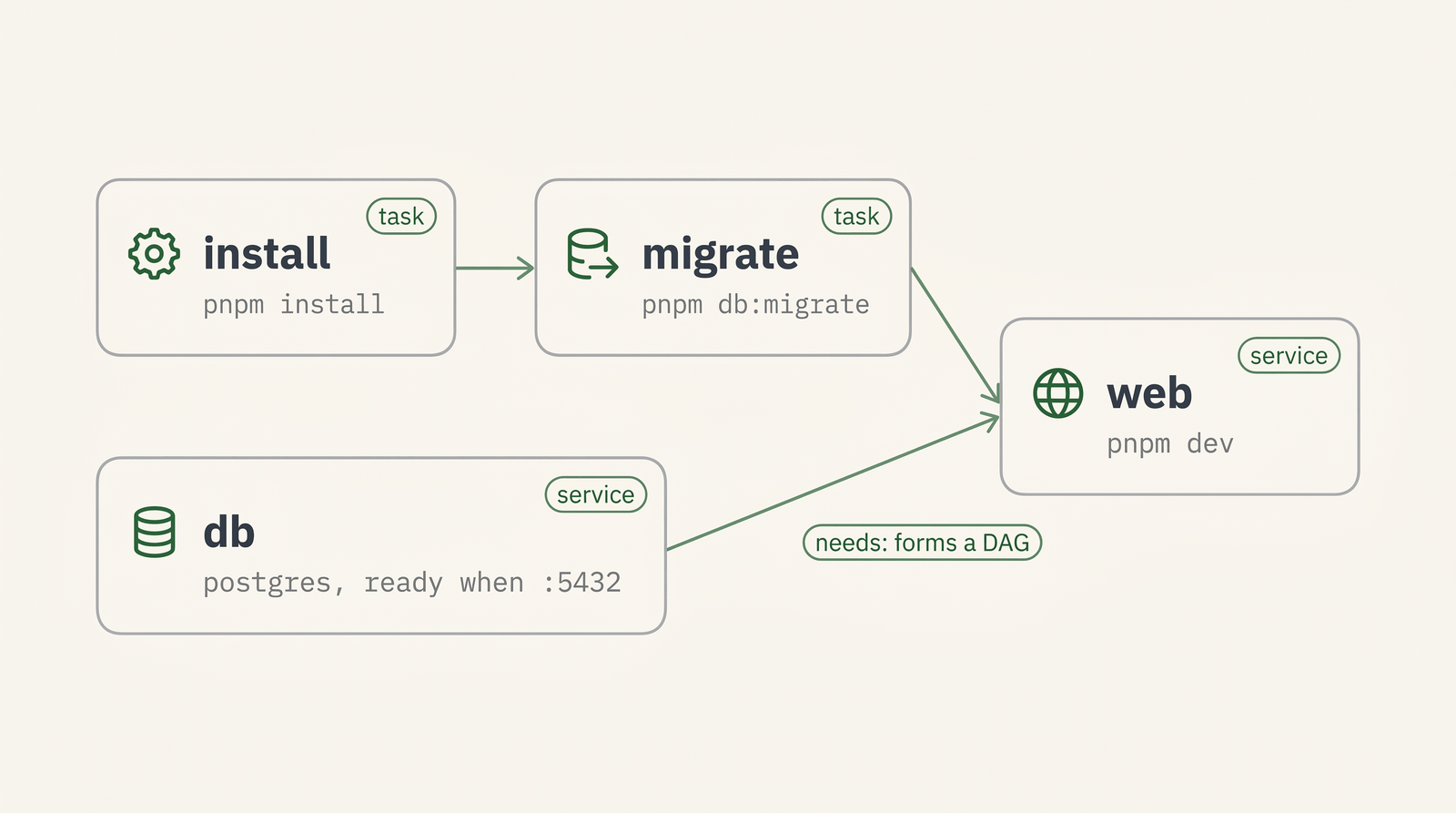
HEADS UP
A needs: referencing a name that doesn't exist, or a dependency cycle, is rejected at config
load — agentbox create aborts before touching Docker.
Seeding & stateful data
Tasks must be idempotent, because they re-run more often than you'd expect:
- On
stop/startthe supervisor is relaunched from scratch, so it re-runs every task frompending. - On a new box from a checkpoint the tasks run again on the warm filesystem.
- Only
pause/unpauseskips them — the daemon is frozen and thawed, not restarted.
For deps, declare run_once: true — the supervisor stores a command-hash marker on the box rootfs and skips warm boots automatically (no hand-written marker file).
A command-hash marker is the wrong guard for a containerized database's seed, though. A docker-in-docker DB keeps its data in a per-box volume that checkpoints don't capture, so a box launched from a checkpoint has the marker but an empty DB — and the seed wrongly skips. Use the run_once: { check } form instead, gating on the actual data: the probe queries the DB for a sentinel row and the seed runs unless it exits 0. That's a no-op once data exists (warm stop/start) and correctly re-seeds an empty DB (fresh checkpoint box).
tasks:
  seed:
    command: pnpm db:seed
    needs: [install, migrate]
    run_once:
      check: |
        export PGPASSWORD=postgres
        psql -h 127.0.0.1 -p 5432 -U postgres -d app -tAc \
          "SELECT EXISTS (SELECT 1 FROM users LIMIT 1)" 2>/dev/null | grep -q t
Status & logs
From the host, inspect and tail units with agentbox status and agentbox logs; inside the box, talk to the daemon directly with agentbox-ctl (status, logs, restart, reload, …). See CLI commands for the full surface.
agentbox services <box> lists the services with their live state (services list <box> --json prints the raw snapshot — services, tasks, ports — for scripting) and agentbox services restart <box> [name] restarts one service (or all when no name is given) — the same controls are on the hub box-detail page and the REST API (GET /boxes/{id}/services, POST /boxes/{id}/services/restart).
$ agentbox status mybox
SERVICE  STATE    PID    RESTARTS
web      ready    1240   0
worker   running  1255   0
TASK     STATE
install  done
The supervisor also posts service-state / task-state events to the host relay on transitions; see background & parallel for how those surface.
TIP
After editing agentbox.yaml in a running box, agentbox-ctl reload applies the diff in place —
no stop/start, no box restart. This is also how a freshly-added expose: web service goes
live.
Units an agent brings with it
Most units come from your agentbox.yaml. An agent can also contribute its own — a service agent is a tool the box runs as a daemon rather than a TUI you attach to, and it declares the service (and any one-shot setup tasks) that run it. Those units arrive from the host when the box asks for the agent catalog, and the supervisor folds them in through the same reload diff as an edit to your file, so a box booted from an older snapshot still runs an agent that did not exist when the snapshot was baked.
Two rules make that predictable:
- Your file wins. A service or task in
agentbox.yamlwith the same name as one the agent contributes replaces it. That is the supported way to override an agent's unit — change its command, its env, or its readiness probe — and the daemon logs which unit it dropped. - Only one unit may
expose:. If your file already publishes the box's web port, the agent'sexpose:is dropped with a warning rather than silently taking it over. Remove one of the two.
A service agent may also own a layered config: it names a top-level agentbox.yaml key as its overlay, and agentbox-ctl agent render <agent> pushes that overlay into the tool's own config file through the tool's own patch command. Only the keys whose overlay value changed since the last render are sent, so anything you edited by hand inside the box survives — and removing a key from the overlay restores the tool's own default rather than freezing the last value AgentBox wrote. Never put a real secret in the overlay; carry it into the box with a carry: entry and reference it by name (the render warns when a value looks like a literal token).
Schema & editor support
A JSON Schema ships with @agentbox/ctl. Add the yaml-language-server modeline to the top of agentbox.yaml and any YAML-LSP editor gives you key completion, hover docs, and inline error squiggles. See agentbox.yaml for the modeline and agentbox-ctl validate details.
The schema does not know an agent's overlay key — which key that is lives in the host's agent catalog, not in the schema — so an editor flags it as unknown. The supervisor accepts it and warns only when no agent claimed it.
For the full file reference (including carry:, ide:, and defaults:), see agentbox.yaml. The defaults: block ties into layered configuration, and the CLI reference lists every agentbox status and agentbox logs flag.