
Hub (Web UI)
A local dashboard for your boxes — served by the host relay at https://agentbox.localhost
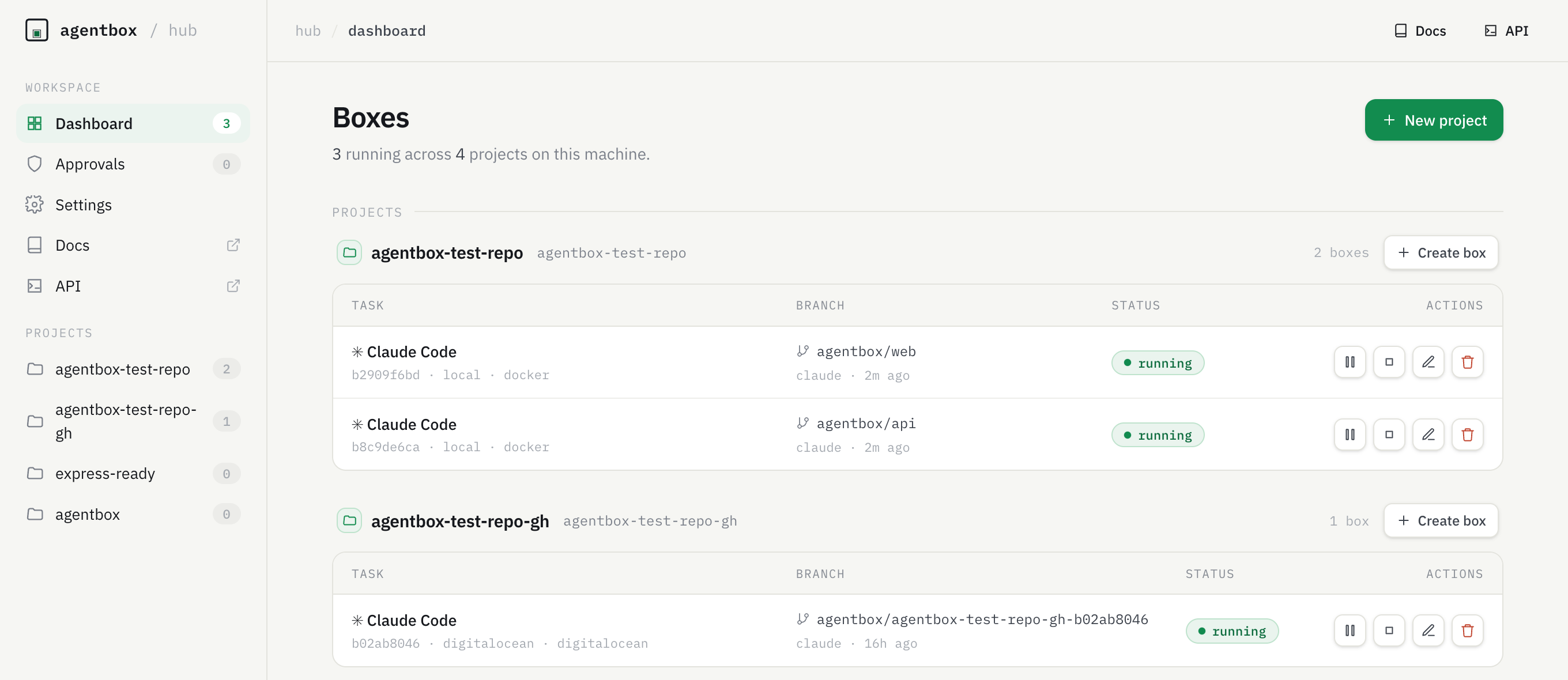
The hub is a local Web UI for your boxes: a dashboard, box detail views, and a
live approvals inbox, served by the host relay. It's the same @agentbox/relay
core you already run, with a Next.js UI delegated onto its port — one process, no
extra port opened.
agentbox hubThat starts the hub (if it isn't already running) and opens it in your browser at
https://agentbox.localhost/?token=<secret>. Start it with the command, not by
typing the URL — the token is what unlocks the hub, and without it the page just
answers 401 AgentBox hub is locked. The first tokened visit stores the secret in
a cookie (30 days) and strips it from the address, so from then on a plain
https://agentbox.localhost gets you in.
Where the friendly URL comes from
https://agentbox.localhost is registered by Portless, the same proxy
AgentBox uses for box web apps. Without it — on OrbStack, when Portless isn't installed, with
portless.enabled: false, or whenever its proxy isn't running — the hub reports the loopback URL
http://127.0.0.1:8787 instead, which works exactly the same way. The hub only ever shows the
.localhost URL when a proxy is actually live, so the address it prints is one you can open. Run
agentbox install portless to have that proxy start at boot.
What's in it
-
Dashboard — every box on this machine, grouped by project, with live status (running / paused / stopped / error) and per-box pause / resume / stop / destroy controls.
-
Box detail — a box's task, agent, branch, host, and timestamps, plus common box operations: Access (open the box's web / VNC URL, and, on a local hub running on macOS, an Apps row that opens the box in a host app — Claude, Codex, VS Code / Cursor, cmux, Herdr, iTerm2, or Finder; the same as
agentbox open --in. Every button is always shown — ones that can't work right now (app not installed, sshfs missing for Finder, not supported for the box's provider, box paused) are disabled with the reason as a hover tooltip), Bot (back up the box — workspace plus the agent's state dir, identity included, shown only for an agent that has one to keep — and clone it, which deliberately does the opposite and gives the new box a fresh identity), Git (pull, push, push to the host repo only, change branch, create a newagentbox/*branch — the whole card is hidden on a box whose workspace is not a git repo, where every one of those would fail) and Services (live state of the box'sagentbox.yamlservices, with restart-one and restart-all). The same operations are on the REST API and the CLI (agentbox git,agentbox services,agentbox open). -
Create box — the same form for both starting points. When the chosen project holds a bot backup, a Start from row offers it: pick one and the form drops the rows the bundle decides for you (base branch, agent, the setup wizard) and the button becomes Restore. It belongs here because a restore is the same decision as a create — which project, which provider, what to call it — with a different starting point.
-
Project detail — the project's boxes, its seed/custody status, and Bot backups: every bot this project holds a backup of, with Restore… opening that same Create box form already pointed at the backup. Only backups that captured an identity are offered; a workspace-only one would start a fresh bot, which is what clone already does.
-
Approvals — the host-action requests a box is blocked on (a destructive
git push,cp,download, gh writes, host-tool calls). Approve unblocks the box; Deny returns an error to it. This is the same gate the relay prompts for in an attached terminal — surfaced in the browser so you can answer from anywhere on your machine. -
Live updates — box states and approvals stream in over SSE; no manual refresh. A pending approval appears the moment a box requests it.
-
Create boxes — register a project folder and start a box (with a provider, an agent, and an optional task) straight from the dashboard; the live build log streams into a panel and the box appears as
creating→running. Pick agent Empty — just create the box to build a box without starting an agent (likeagentbox create); attach later withagentbox shell. The Provider picker offers docker plus any cloud provider set up on this host — providers you haven't configured yet show up disabled (set them up under Settings → Sandbox providers, below). The Provider and Agent pickers open on whatever that project's last box was created with — from here, the tray, or the CLI — falling back to Docker and Claude, and to Docker again when the remembered provider isn't set up on this host. Pick a Base branch to fork the box from a ref other than the project's current HEAD (like--from-branch). Under Advanced, pick a Size to give the box more CPU and RAM than the provider's default — the choices come from the provider itself (cx43on Hetzner,4vCPU on Vercel,4-8-10on Daytona; there is no common grammar), with a Custom… option where the backend accepts free-form values. Docker has no Size row: it sizes withbox.memory/box.cpus. On Daytona and E2B the size is fixed when the base image is baked, so choosing a different one rebuilds the base first — the form says so before you commit. When a project has noagentbox.yamland no default snapshot, a Run setup wizard toggle (on by default) seeds the agent's first turn to explore the repo and propose anagentbox.yaml. -
Manage projects — register a folder as a project (a folder picker browses your machine), or create a new one from the same dialog: pick the parent folder, type a name and the hub makes the empty folder for you (optionally
git initwith an initial commit). That is the path for a project with no workspace yet — hosting an OpenClaw bot, say — whose files are born inside the box. Remove an empty project (0 boxes) with the Delete button on its dashboard/detail header. Deleting only unregisters the folder from the hub — its files, git repo, and checkpoints are untouched. -
Sandbox providers (Settings) — set up a cloud provider without a terminal: paste its credentials (an API key/token — validated and saved to
~/.agentbox/secrets.env) and Bake its base image, with the build log streaming live just like a box create. Once baked, the provider flips to ready and becomes selectable in the create dialog. Docker needs no credentials (its base self-heals); the rest is the samelogin+preparethe CLI does, driven from the browser. Provider install- bake run on the host that owns Docker/SSH, so they need the local or full-host hub (not the serverless plane).
Driving it programmatically
Everything the UI does is also available over HTTP — see the REST API for launching and managing boxes from an IDE, a script, or a remote hub.
Commands
agentbox hub              # start + open in the browser (default)
agentbox hub --no-open    # start without opening a browser, just print the URL
agentbox hub start --local  # start the hub HERE even with a control box configured
agentbox hub status       # is it running? (add --json)
agentbox hub stop         # stop the hub process
agentbox hub restart      # stop then start
agentbox hub adopt <box>  # make a control-box-created box usable from this laptop
agentbox hub pull <box>   # download only its SSH keys (adopt does this too)
With a control box configured, agentbox hub opens that hub rather than starting one here — it is the hub the CLI already talks to and the one holding your boxes. Nothing on this machine is lost: local commands that need the hub here start it themselves, agentbox hub start --local forces it, and hub stop/hub restart still act on the local process. An exposed machine (agentbox hub expose) is its own control box, so agentbox hub still starts it.
hub adopt and hub pull both need a configured control box. hub adopt writes the local box record and downloads the box's SSH keys, so agentbox attach / cp / url / screen work exactly as for a box you created here — you rarely need to run it by hand, because referring to a control-box box by name adopts it automatically. hub pull is the keys-only half, writing ~/.agentbox/boxes/<sandboxId>/ssh/.
How it relates to the relay
The hub is a superset of the host relay — it embeds the relay and adds the UI,
on the same port (8787, or whatever relay.port is set to —
one key moves both). The two are mutually exclusive there, so:
agentbox hubtakes over from a bareagentbox relayif one is already running.- Once the hub is up, ordinary box commands (
agentbox create,claude, …) reuse it — they don't spawn a second relay.
So you can run agentbox hub once and leave it; everything else keeps working
through it. Stopping the hub (agentbox hub stop) frees the port, and the next box
command brings a lean relay back automatically.
Auth
On localhost the hub binds loopback (127.0.0.1) and gates access with a
per-machine token — there's no login screen. agentbox hub generates a secret
at ~/.agentbox/hub/token (mode 0600) and hands it to you in the URL; the hub
stores it in an httpOnly cookie and redirects to the clean URL. Direct access
without the token is refused (401). This protects the loopback bind from other
local processes and DNS-rebinding. AGENTBOX_HUB_AUTH=off disables the gate.
That same ?token= handshake is what makes the (VNC) link in agentbox ls
clickable: the link points at the hub's /boxes/{id}/vnc redirect, which mints a
fresh viewer URL and 302s to it. A terminal click carries no Authorization
header, so the token rides the query string, is swapped for the cookie, and the
clean URL is what the box's desktop sees (the redirect also sends
Referrer-Policy: no-referrer so the token is never forwarded on). On a
password-profile hub — a deployed control box — page routes require a real
login instead, so the first such click of a session lands on /signin.
Requirements
The hub server needs Node ≥ 22.5 (the lean relay and the rest of the CLI keep a lower floor).
If you're below that, agentbox hub prints a clear error — use agentbox relay instead.
Running it for a team
agentbox hub is the single-user, on-your-machine UI. For a shared, multi-user
deployment with password login and a cross-machine box registry — so cloud boxes
keep working with your laptop off — deploy the same app as the hosted
control plane (Vercel or a VPS, backed by Postgres).