
Orchestration & queue boxes
Run many boxes at once, queue background runs with -i, and drive a fleet of agents programmatically
AgentBox is built for fan-out. Every box is fully isolated — its own container and its own agentbox/<box-name> branch in a worktree (see core concepts) — so several agents can work the same repo at once without stepping on each other.
There are three capabilities here. Running boxes in parallel means you launch several agent sessions yourself, foreground or detached. The -i background queue lets you submit prompts that the host relay schedules and runs unattended, capped so you don't melt your laptop or burn quota. And orchestration lets a host-side agent (or any script) drive the fleet — read what each box is doing, send it keystrokes or a prompt, watch its live state, and block on queue and box lifecycle events.
Run boxes in parallel
Each agentbox claude / codex / opencode / pi call spins up a separate box — separate container, branch, and /workspace worktree. They never share state. Each gets an auto-numbered name; pass -n <name> if you want to label them in ls and top.
# Three independent boxes on the same repo, each on its own branch
agentbox claude
agentbox claude
agentbox codex
It's one agent per box, but a box can hold multiple shell sessions — see access your box. To launch many without the queue, detach each as you go: Ctrl+a d leaves the agent running, and agentbox attach <box> reattaches later.
HEADS UP
These run with no concurrency cap — they all start immediately and each consumes CPU, RAM, and
agent quota. To have AgentBox pace the runs for you, use the -i background queue below.
Queue background runs with -i
-i, --initial-prompt <text> (on agentbox claude, codex, opencode, and pi) seeds the agent session with a first user turn and runs the box in the background — no attach. The call writes a queue manifest and returns immediately.
agentbox claude -i "Upgrade all dependencies and fix the build"Jobs go through a host-wide FIFO queue, capped by queue.maxConcurrent. The relay's scheduler starts each job as a slot frees, starting the relay automatically if needed. On submit you get the job id (the handle for queue show / queue cancel) and a path to its log:
$ agentbox codex -i "Draft the v0.13 changelog from git log"
job a1b2c3d4e5f6a1b2c3 queued (2/5 running); log: ~/.agentbox/queue/a1b2c3d4e5f6a1b2c3.log
Credentials for the chosen agent must already be on the host — the background worker can't do an interactive login. If they're missing, submission fails loud. Authenticate first (see run an agent).
By default a queued run opens nothing — attach later with agentbox attach <box>. To have the box pop open automatically the moment its worker finishes creating it, set queue.openIn to split, window, or tab (when you submit from inside tmux, cmux, or iTerm2). The relay opens an attached terminal onto the box for you — no need to watch for it to come up.
NOT PRINT MODE
-i is --initial-prompt (the background queue), not Claude's own -p headless print mode. The difference: -i seeds a real, interactive agent session you can attach to, drive, and resume — it just starts detached. -p is the non-interactive print mode that runs once and exits. To use print mode, pass it through after --:
agentbox claude -- -p "Summarize the open PRs"-i can't combine with -c / --resume or --plan. Per-job, --max-running and --max-working override the global caps. See CLI commands for all flags.
Tune the queue
The queue is configured with global config keys (the relay is host-wide, so project and workspace layers are intentionally ignored — always use --global). Changes take effect on the next relay tick, no restart.
| Key | Default | Meaning |
|---|---|---|
queue.enabled | true | Run -i jobs through the host-wide FIFO queue. |
queue.maxConcurrent | 5 | Max simultaneously running boxes (all providers) before -i jobs queue. |
queue.maxWorking | 0 (off) | Max agents actively working (quota-consuming) at once; 0 falls back to the running-box gate. |
queue.idleGraceSeconds | 15 | Seconds an agent must stay non-working before it frees its working slot. |
queue.openIn | none | When a queued box becomes ready, open an attached terminal onto it: split, window, or tab (tmux/cmux/iTerm2). none opens nothing. |
The default caps running boxes. Turn on queue.maxWorking for a smarter working-agent cap — paused or idle boxes don't count, so you can keep more boxes alive cheaply (see checkpoints and pausing) while still bounding active quota burn. Because maxConcurrent counts boxes across all providers, cloud -i jobs on Daytona, Hetzner, or Vercel share the same gate.
# Allow 3 boxes running at once before -i jobs wait their turn
agentbox config set --global queue.maxConcurrent 3
For the full key reference and config precedence, see configuration.
Manage the queue
agentbox queue inspects and manages background -i jobs: queue list shows queued + running jobs, queue show <id> dumps the manifest and tails the log, queue cancel <id> cancels a queued job, queue clear sweeps terminal-state manifests, and queue wait-for <event> blocks until a queue/box event fires (the scripting gate). See CLI commands for all flags.
agentbox queue list            # active jobs (queued + running)
agentbox queue show <id>       # manifest + tail the job log
agentbox queue cancel <id>     # cancel a *queued* job (not a running one)
queue list prints one row per job and a footer with the live cap:
$ agentbox queue list
id            status   agent   box           provider  age
------------  -------  ------  ------------  --------  ----
a1b2c3d4e5f6  running  codex   changelog     docker    2m
b7c8d9e0f1a2  queued   claude  nightly-deps  docker    30s

queue.maxConcurrent = 5 (queue.enabled=true)
queue wait-for <event> blocks on queue and box lifecycle transitions (empty-queue, box-running/box-paused/box-stopped, job-done, …) — useful to settle a whole batch. See CLI commands for the full event list and flags. For driving a single agent's turn, reach for agent wait-for below — that's the primary orchestration gate.
CANCEL VS DESTROY
queue cancel only stops jobs still in queued. A running job keeps going — stop it by destroying its box with agentbox destroy <box> (the error message tells you the box name).
Orchestrate boxes from an agent
The real power of fan-out is letting an agent run the fleet for you. Ask Claude Code (or Codex / OpenCode) on your laptop to "spin up three boxes, fan out this work, watch them, and report back when they're done" — and it can, because AgentBox installs a host skill that teaches it the whole orchestration surface.
The /agentbox-info skill
agentbox install drops a reference skill at ~/.claude/skills/agentbox-info/SKILL.md (a managed, non-invocable skill — your host agent reads it automatically; you don't call it). It documents how to provision boxes, queue -i jobs, drive a box's terminal, monitor agent state, and push commits through the host relay — so the host agent already knows the commands below. It's distinct from /agentbox (the host-side fork — see run an agent) and the in-box /agentbox-setup wizard.
Three command families do the actual driving. All are stateless one-shot commands, safe to call from any script or any agent in parallel, and every one takes --json for machine-friendly output.
agentbox drive — read the screen, send keystrokes
agentbox drive <box> targets the box's running agent tmux session (auto-picking claude → codex → opencode → pi) and is provider-uniform across docker, Daytona, Hetzner, and Vercel.
agentbox drive snapshot 1                              # print the rendered TUI as plain text
agentbox drive snapshot 1 --json --rows -200:-1        # JSON envelope, walk into scrollback
agentbox drive keypress 1 "<C-c>"                      # DSL: <Enter>, <C-x>, <Tab>, <Up>, <F5>, ...
agentbox drive send-text 1 "hello"                     # literal text, no DSL, no trailing Enter
agentbox drive prompt 1 "summarize /workspace/README"  # type + Enter — send a message to the agent
agentbox drive wait 1 --text "✓" --timeout 60000       # block until <text> appears on screen
agentbox drive resize 1 200 60
agentbox agent — monitor the agent's live state
Where drive reads raw pixels, agentbox agent reports what the agent is doing, hook-driven and race-free. The state is one of working | idle | waiting | end-plan | question | prompt | compacting | error | input-needed — so you can watch a box flip from working to idle, or block until it needs you. It reads the box's most active agent by default; pass --agent <id> to name one explicitly.
agentbox agent state 1                              # → working | idle | waiting | end-plan | ...
agentbox agent wait-for input-needed 1              # wake whenever the agent needs you: question, plan, permission, done, or error
agentbox agent wait-for idle 1 --timeout 1200000    # block until the turn completes (Stop hook)
agentbox agent wait-for prompt 1                    # block until it's ready for the next message
agentbox agent wait-for end-plan 1                  # Claude just called ExitPlanMode; awaits approval
agentbox agent wait-for question 1                  # an AskUserQuestion picker is up
agentbox agent get-plan-question 1                  # read the pending plan body or question + options
agentbox agent state 1 --agent codex                # read a specific agent, not the box's most active one

agentbox agent wait-for input-needed --box design --box tests --box docs   # race N boxes, first to need you wins
--box is repeatable: one waiter covers a whole fan-out instead of one background process per box. It returns as soon as any of them matches, and prints <box>\t<state> (with --json, { "box": { "id", "name" }, "state", "agent" }) so you know which one woke. A single-box wait prints just the state, exactly as before.
A wait rides out a hub restart: the host relay going away mid-wait is retried with backoff until your --timeout elapses, not treated as the end of the wait. The exit code says which kind of ending you got:
| Exit | agent wait-for |
|---|---|
0 | matched — the state is on stdout |
1 | timed out; the hub was answering, the agent just never got there |
2 | unknown state name, or the box is not on the hub that owns it |
3 | the hub rejected the credential |
7 | the hub never answered — the agent's state is unknown, not unmatched |
Only the value goes to stdout — progress, warnings and errors go to stderr — so STATE=$(agentbox agent wait-for input-needed 1) is always clean.
input-needed is the most important orchestration event — the single signal that you (or the orchestrating agent) need to take action. It fires whenever the agent stops working and wants a human, whether because the task finished and the prompt is ready for the next message, or because the subagent is blocked on a question, a plan to approve, a permission prompt, or an error. It's the robust replacement for chaining separate wait-for end-plan / wait-for question / wait-for prompt calls — each of those hangs until its timeout if the agent happens to reach a different state. wait-for input-needed also prints the concrete state it matched (prompt / end-plan / question / waiting / error), so a script can branch on why it woke.
| State | agent wait-for matches when |
|---|---|
input-needed | the agent needs you for anything — a question, plan approval, permission prompt, finished turn (prompt ready), or an error (i.e. any state except working / compacting) |
prompt | idle, session up, no pending plan/question — ready for the next message |
idle | the turn finished (Stop hook fired) |
end-plan | ExitPlanMode fired — a plan awaits approval |
question | an AskUserQuestion picker is up |
waiting | a tool/permission prompt is pending |
working | the agent is actively working |
compacting | the context is being compacted |
error | the turn ended in an error |
Putting it together
-i to launch, agent wait-for to sync on the agent's turn (the primary gate — input-needed to wake on anything, or a specific state when you know what to expect), drive to act, and queue wait-for to settle the batch compose into a "drive one agent from another" loop:
# 1. Kick off a box with a planning prompt, in the background.
agentbox claude -n design -i "Plan an OAuth login flow for apps/web, then enter plan mode."

# 2. Wait until it reaches the plan-approval prompt, then read the plan back.
agentbox agent wait-for end-plan design --timeout 600000
agentbox agent get-plan-question design

# 3. Approve (option 1 is pre-highlighted) and wait for the turn to finish.
agentbox drive keypress design "<Enter>"
agentbox agent wait-for prompt design --timeout 1200000

# 4. Fan out follow-up work, then block until everything settles.
agentbox claude -i "Write the OAuth provider unit tests in apps/web/test/auth/"
agentbox queue wait-for empty-queue --timeout 3600000
The mental model: agent wait-for is the primary gate — it blocks until the agent's turn reaches a state you care about (input-needed wakes on any), drive sends keystrokes and reads the screen, agent state tells you what the agent's TUI is doing, and queue wait-for settles the whole batch on queue and box lifecycle transitions. For the full flag tables, see CLI commands.
Approve what a box is blocked on
A box blocks on two kinds of approval, and agent approvals / agent approve cover both:
- Relay host-action approvals — things the box has no credentials for (
git push, copy a file to/from the host, open a PR, capture a checkpoint). The host relay raises a confirmation; normally the human answers it in the attachedagentbox claudefooter. - In-TUI agent prompts — the agent's own dialogs: a Claude plan-mode approval, an
AskUserQuestion, a tool-permission prompt. These used to require hand-crafteddrive keypresssends.
An unattended orchestrator answers either kind, deliberately, with one surface:
# List everything the box is blocked on — each row carries an id and a kind.
agentbox agent approvals design --json
# [{ "id": "…uuid…",            "kind": "host-action", "command": "git push", "argv": ["origin","HEAD"] },
#  { "id": "tui:design:plan:…", "kind": "plan",        "plan": "# Plan: …" }]

# Answer that exact prompt. Default approves (or picks the first/recommended option).
agentbox agent approve <id>
agentbox agent approve <id> --option 2          # in-TUI question/plan: pick option 2 (or --option "Risk first")
agentbox agent approve <id> --deny              # reject (relay: deny; in-TUI: Escape)

# Block until something is pending, then act on it.
agentbox agent approvals design --wait 600000
The id is a safety token. approve <id> answers the specific prompt you listed; if a different prompt has since taken its place, the recomputed id won't match and the approve is refused — it never answers the wrong thing. So the loop is always approvals → read the command/argv/options → approve <id>, one at a time, never blanket-approving whatever the box asks. For relay approvals that also keeps a prompt-injected box from laundering a malicious push through your credentials (only a host process can answer — the relay endpoint is loopback-only); the orchestrator already holds your git and file credentials, so answering grants nothing new. In-TUI keystroke mapping is best-effort and TUI-version-sensitive — if an approve doesn't take, fall back to drive.
For a fully-unattended run over trusted boxes, opt into blanket auto-approval per box:
agentbox config set box.autoApproveHostActions true --projectWith it on, those confirmations resolve to yes without surfacing — but every auto-approval is recorded as a host-action-auto-approved relay event (visible in agentbox agent and the dashboard), so the bypass is auditable, never silent. It applies to boxes created after you set it; leave it off (the default) to keep the inspect-then-approve loop above.
Monitor everything at once
Three complementary views for a parallel fleet:
agentbox ls              # box inventory for this project (-g for all projects)
agentbox top             # live htop-style cpu/mem/disk across boxes (-p for this project)
agentbox dashboard       # full-screen multi-box TUI
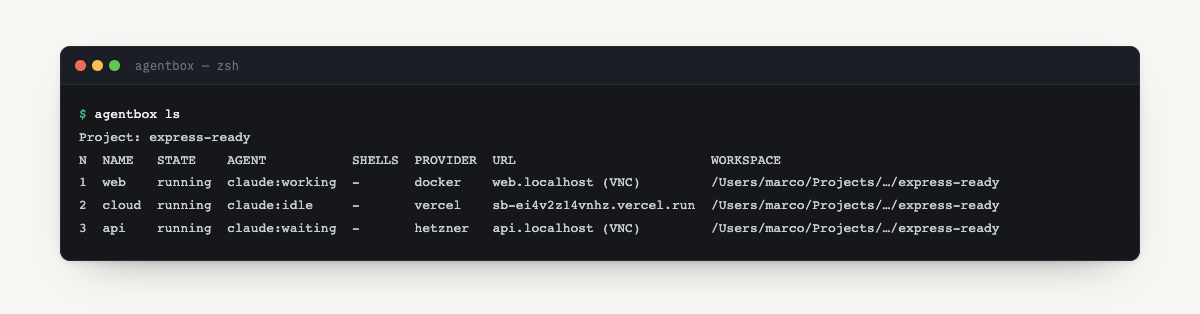
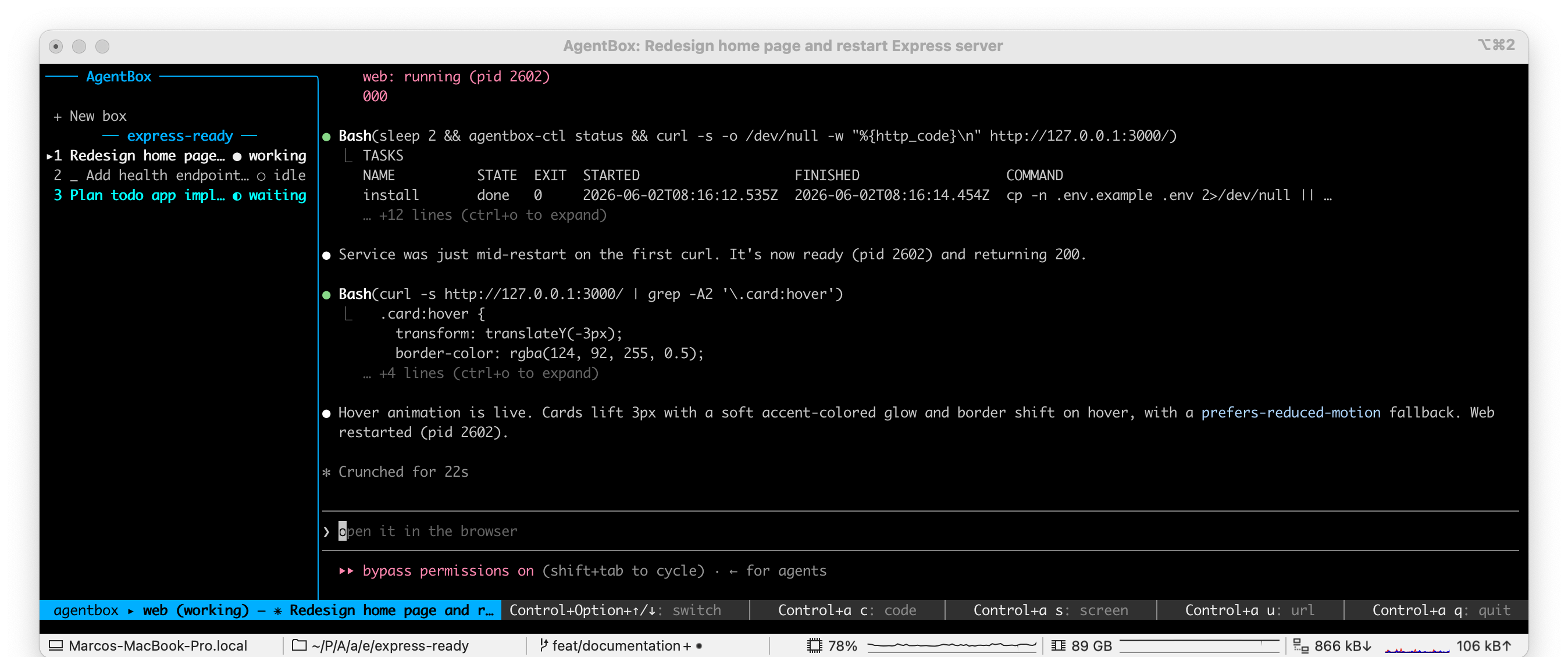
agentbox ls (alias of list) is the box inventory — state, branch, web/VNC endpoints, and a shell count. agentbox top is a live resource monitor across boxes, auto-refreshing. agentbox dashboard is the full-screen TUI: box list on the left, the selected box's live agent session on the right. See CLI commands for all flags.
$ agentbox top --once
BOX           STATE    CPU%   MEM USAGE / LIMIT   MEM%   PIDS  DISK    NET I/O
auth-refactor running   42.0%  1.2GiB / 8.0GiB     15.0%  37    820MiB  4.1MB / 1.2MB
perf-pass     running   18.5%  640MiB / 8.0GiB      7.8%  21    410MiB  900kB / 210kB
flaky-fix     paused     —     —                     —    —     390MiB  —

SYSTEM: ~/.agentbox: 3.4GiB - checkpoints: 1.1GiB
Per-box live CPU/mem metrics are docker-only; cloud boxes show — for those columns.
NOTE
The dashboard compositor is Claude-only today. agentbox codex / opencode / pi runs work in
parallel but aren't shown in the dashboard panes yet — use agentbox top / agentbox ls to
monitor those.